

10. Monitoring GPUs#
HPCToolkit can measure both CPU and GPU performance of GPU-accelerated applications. It measures CPU performance using asynchronous sampling, as described in Section 6.1, and it measures GPU operations using tool libraries or interfaces provided by GPU vendors. A single build of HPCToolkit can support GPUs from AMD, NVIDIA, and Intel.
In this chapter, we describe HPCToolkit’s capabilities for profiling, tracing, and PC sampling of GPU-accelerated applications that use a variety of vendor runtimes and tool interfaces, including ROCm (AMD), CUDA (NVIDIA), Level Zero (Intel), OpenCL (all GPUs), and/or OpenMP (all GPUs).
Section 9.1 provides a quick start guide for using HPCToolkit to measure GPU-accelerated applications. Subsequent sections describe profiling (Section 9.2), tracing (Section 9.3), PC sampling (Section 9.4), top-down microarchitectural analysis (Section 9.5), and associated platform-independent metrics. The chapter concludes with sections on AMD GPUs (Section 9.6), NVIDIA GPUs (Section 9.7), and Intel GPUs (Section 9.8) that discuss platform-specific measurement details or metrics.
10.1. GPU Measurement Quickstart#
HPCToolkit provides a vendor-independent monitoring substrate for measuring the performance of GPU-accelerated applications. This substrate interfaces with NVIDIA’s CUPTI (CUDA Performance Tools Interface) and AMD’s Rocprofiler-sdk. It also supports intercepting calls to the OpenCL API and Intel’s Level Zero API because OpenCL and Level Zero lack a measurement API like CUPTI or Rocprofiler-sdk.
For each of the supported GPU runtimes (ROCm, CUDA, Level Zero, and OpenCL), HPCToolkit supports several monitoring options. All of the GPU runtimes support profiling and tracing of GPU operations. ROCm, CUDA, and Level Zero support instruction-level measurement within GPU kernels using PC sampling. Level Zero also supports instruction-level performance measurement within GPU kernels using binary instrumentation with Intel’s GTPin.
Table 9.1 shows arguments to hpcrun that can be used to monitor the performance of GPU operations offloaded by HIP or OpenMP on AMD GPUs.
Argument to |
What is monitored |
|---|---|
|
coarse-grain profiling of AMD GPU operations |
|
coarse-grain profiling and tracing of AMD GPU operations |
|
coarse-grain profiling and high-resolution tracing of AMD GPU operations |
|
coarse-grain profiling of GPU operations; fine-grain profiling within GPU kernels using PC sampling every 2^k cycles (hw) or 2^k ns (sw). |
AMD GPUs support two types of PC sampling: hardware (hw) and software-only (sw). sw PC sampling is the default mode because it is available on MI200+; hw PC sampling is available only on MI300+. Forsw PC sampling, HPCToolkit’s default period is 2^20 ns. For hw PC sampling, the default period is 2^20 cycles.
Normal tracing (-t) collects CPU trace entries using asynchronous sampling and GPU trace entries at the beginning and end of every GPU operation.
High-resolution tracing (-tt) additionally records a CPU trace entry each time a CPU thread launches a GPU operation, if any.
For programs that launch many GPU operations per second, -tt will collect a more useful trace than -t.
Without -tt, the activity seen on a CPU trace line at the time it launches a GPU operation
is often from far earlier in the execution, which can make it difficult to relate to concurrent CPU and GPU activity.
Tip
For all GPU events, you may combine CPU and GPU profiling events in the same run.
For example, hpcrun -e REALTIME -e gpu=rocm -t ... would profile and trace activity on the CPU using the default CPU sampling period while profiling and tracing GPU operations as well.
Tip
You can use -t or -tt while collecting PC samples to see qualitative timings; however, the overhead of processing PC samples is likely to distort timings in traces. For accurate timings in traces, we recommend collecting PC samples and traces in different executions.
Table 9.2 shows arguments to hpcrun that can be used to monitor the performance of GPU operations offloaded by CUDA or OpenMP on NVIDIA GPUs.
On NVIDIA GPUs, HPCToolkit’s default period for PC sampling is 2^20 cycles.
Argument to |
What is monitored |
|---|---|
|
coarse-grain profiling of GPU operations |
|
coarse-grain profiling and tracing of GPU operations |
|
coarse-grain profiling and high-resolution tracing of GPU operations |
|
coarse-grain profiling of GPU operations; fine-grain profiling within GPU kernels using PC sampling every 2^k cycles |
Table 9.3 shows available options for using HPCToolkit that can be used to monitor the performance of GPU operations offloaded by SYCL or OpenMP to Intel’s Level Zero runtime. On Intel GPUs, HPCToolkit’s default period for PC sampling is 2^20 ns.
Argument to |
What is monitored |
|---|---|
|
coarse-grain profiling of GPU operations runtime |
|
coarse-grain profiling and tracing of GPU operations |
|
coarse-grain profiling and high-resolution tracing of GPU operations |
|
coarse-grain profiling of GPU operations; fine-grain measurement within kernels using binary instrumentation to count instructions |
|
coarse-grain profiling of GPU operations; fine-grain profiling within GPU kernels using PC sampling every 2^k ns |
Table 9.4 shows the possible command-line arguments to hpcrun for monitoring OpenCL programs.
Argument to |
What is monitored |
|---|---|
|
coarse-grain profiling of GPU operations using a platform’s OpenCL runtime |
|
coarse-grain profiling and tracing of GPU operations using a platform’s OpenCL runtime |
|
coarse-grain profiling and high-resolution tracing of GPU operations using a platform’s OpenCL runtime |
If OpenMP is implemented using the OMPT interface, then no special arguments are needed to turn on monitoring.
10.2. Profiling GPU Operations#
In most cases, HPCToolkit reports performance metrics for GPU operations in a vendor-neutral way. GPU vendors and programming models use different names for the same concepts. The names of HPCToolkit’s GPU metrics use the vendor-neutral terms in Table 9.5 for the levels of the GPU execution hierarchy and for the memory and registers at each level.
Term |
NVIDIA (CUDA) |
AMD (ROCm/HIP) |
Intel GPU (Xe) |
SYCL |
OpenCL |
|---|---|---|---|---|---|
SM/CU |
streaming multiprocessor (SM) |
compute unit (CU) |
Xe-core |
compute unit⁷ |
compute unit⁷ |
BLK |
CUDA thread block |
HIP thread block / ROCm workgroup |
work-group |
work-group |
work-group |
WRP |
warp (32 threads) |
HIP warp or ROCm wavefront (32 or 64) |
sub-group / Execution Unit (EU) thread² |
sub-group |
sub-group (2.1+) |
THR |
thread |
thread, work-item, or lane¹ |
work-item or SIMD lane² |
work-item |
work-item |
BLK_MEM |
shared memory |
Local Data Share (LDS) |
Shared Local Memory (SLM) |
local memory ( |
local memory ( |
WRP_REG |
uniform registers (Turing+)³ |
Scalar General-Purpose Registers (SGPRs) |
not reported⁴ |
not exposed⁵ |
not exposed⁵ |
THR_REG |
registers |
Vector General-Purpose Registers (VGPRs) + CDNA Accumulator General-Purpose Registers (AGPRs)⁶ |
General Register File (GRF), normalized per work-item⁴ |
not exposed⁵ |
not exposed⁵ |
THR_MEM |
local memory (spills, per-thread arrays) |
scratch / private segment |
private memory / scratch (spills) |
private memory |
private memory ( |
Notes on Table 9.5:
AMD naming: HIP source uses the CUDA names. The work-group/wavefront/work-item names come from AMD’s hardware and ROCm documentation.
Intel “thread”: an Intel hardware thread is an Execution Unit (EU) or Vector Engine thread, which corresponds to WRP, not THR.
NVIDIA uniform registers: these hold warp-uniform values in the uniform datapath. The compiler manages them; CUDA source has no way to name them.
Intel General Register File (GRF): Intel has no separate scalar register file. Warp-uniform values are held in the GRF and counted in THR_REG, so WRP_REG is not reported (it isn’t 0). Intel GPUs allocate registers, private memory, and spill memory to each hardware thread, which runs all the work-items of a sub-group. HPCToolkit divides these by the kernel’s SIMD width to report THR_REG as 32-bit registers per work-item and THR_MEM as bytes per work-item. THR_REG counts the GRF registers allocated to the kernel (128 or 256 per hardware thread, depending on its GRF mode), not the registers its code uses.
SYCL and OpenCL: the programming models don’t expose registers. The compiler places private variables in vendor registers, and they spill to THR_MEM.
AMD Accumulator General-Purpose Registers (AGPRs): on CDNA (MI100 and later), accumulation registers are per-lane vector registers used mainly by matrix (MFMA) instructions. On MI200 and later they form a unified file with the Vector General-Purpose Registers (VGPRs).
SM/CU: the hardware unit on which a block’s warps are resident. SM/CU appears in metric descriptions but not in metric names. A SYCL or OpenCL compute unit is whatever the device reports; Intel’s runtimes report each Execution Unit (EU) or Vector Engine as a compute unit, not each Xe-core.
The table describes the terms for each of the vendor GPUs and programming models. Which metrics HPCToolkit currently reports for each GPU is described with the metrics below.
Coarse-grain profiling attributes to each calling context the total time of all GPU operations initiated in that context. Table 9.6 shows the classes of GPU operations for which timings are collected. HPCToolkit also reports GPU kernel characteristics, including memory and register usage, thread count per block, and (for NVIDIA GPUs) theoretical occupancy, as shown in Table 9.7. Kernel memory and register metrics are reported per block (BLK), per warp (WRP), or per thread (THR), using the terms in Table 9.5. Each kernel characteristic metric is the average over the kernel launches in a calling context.
An important factor that affects the performance of GPU kernels is known as occupancy. Percent occupancy is a measure of how many warp/wave slots on an NVIDIA streaming multiprocessor (SM) or AMD compute unit (CU) are filled relative to the number available. Occupancy affects performance because GPUs attempt to hide memory and instruction latency by switching among warps or wavefronts whenever an instruction stalls. When there are more resident warps/waves on an SM or CU, the scheduler has more options when some are stalled, and is more likely to hide stall latency. There are two forms of occupancy.
Theoretical occupancy is computed from the maximum number of resident warps/waves possible given resource constraints, including the number of registers per thread, shared memory per block/workgroup, and threads per block/workgroup.
Measured occupancy is computed from the average number of resident warps/waves observed during execution.
Measured occupancy is typically lower than theoretical occupancy because of tail effects, load imbalance, too few blocks to fill the GPU, and block launch overhead.
Higher occupancy isn’t always faster. A kernel with enough instruction-level parallelism, or one that’s compute-bound, may run best at low occupancy while using extra registers or shared memory per block.
The information available at runtime on a GPU limits the occupancy measures that HPCToolkit can compute. The names of theoretical occupancy metrics end in _T, and the names of measured occupancy metrics end in _M.
On NVIDIA GPUs, HPCToolkit computes theoretical occupancy for each kernel launch from its block size, registers per thread, and shared memory per block.
GKER:WRP_ACT_Tis the maximum number of resident warps per SM that the launch can use,GKER:WRP_AVLis the available warps per SM, andGKER:OCC_Tis 100 * (WRP_ACT_T/WRP_AVL). Measured occupancy is not reported for NVIDIA GPUs.On AMD GPUs, HPCToolkit computes measured occupancy using PC sampling, as described with Table 9.15. Because samples come only from active CUs, this measure does not reflect CUs left idle when there are too few blocks to fill the GPU. Theoretical occupancy is not reported for AMD GPUs.
On Intel GPUs, HPCToolkit does not currently report occupancy.
In addition, HPCToolkit records metrics for operations performed including memory allocation and deallocation (Table 9.8), memory set (Table 9.9), explicit memory copies (Table 9.10), and synchronization (Table 9.11). These operation metrics are available for GPUs for AMD, Intel, and NVIDIA GPUs. While summary metrics in Table 9.6 and Table 9.7 are shown by default in hpcviewer, metrics marked with an asterisk in Tables 9.8, 9.9, 9.10, and 9.11 are hidden by default to avoid overwhelming users with many columns of metrics. In hpcviewer, one can reveal any hidden metric by opening its metric pane marking the metric as visible.
Metric |
Description |
|---|---|
GKER |
GPU time: kernel execution (seconds) |
GMEM |
GPU time: memory allocation/deallocation (seconds) |
GMSET |
GPU time: memory set (seconds) |
GXCOPY |
GPU time: explicit data copy (seconds) |
GSYNC |
GPU time: synchronization (seconds) |
GPUOP |
Total GPU operation time: sum of all metrics above (seconds) |
Metric |
Description |
|---|---|
GKER:BLK_MEM |
GPU kernel: on-chip memory per block (NVIDIA shared memory, AMD LDS, Intel SLM) (bytes) |
GKER:BLK_MEM:STAT |
GPU kernel: static part of block memory (bytes) |
GKER:BLK_MEM:DYN |
GPU kernel: dynamic part of block memory (NVIDIA dynamic shared memory, AMD dynamic LDS, Intel SLM kernel arguments) (bytes) |
GKER:THR_MEM |
GPU kernel: private memory per thread for spills and stack (NVIDIA local memory, AMD scratch, Intel private memory) (bytes) |
GKER:WRP_REG |
GPU kernel: registers per warp (AMD SGPRs; not reported for NVIDIA or Intel GPUs) |
GKER:THR_REG |
GPU kernel: registers per thread (NVIDIA registers; AMD VGPRs and AGPRs; Intel GRF) |
GKER:WRP_ACT_T |
GPU kernel: theoretical active warps per SM/CU |
GKER:WRP_AVL |
GPU kernel: available warps per SM/CU |
GKER:BLK_THR |
GPU kernel: thread count per block |
GKER:BLKS_AVG |
GPU kernel: average block count per launch |
GKER:COUNT |
GPU kernel: launch count |
GKER:OCC_T |
GPU kernel: theoretical occupancy (NVIDIA): 100 * (WRP_ACT_T / WRP_AVL) |
Metric |
Description |
|---|---|
GMEM:UNK* |
GPU memory alloc/free: unknown memory kind (bytes) |
GMEM:PAG* |
GPU memory alloc/free: pageable memory (bytes) |
GMEM:PIN* |
GPU memory alloc/free: pinned memory (bytes) |
GMEM:DEV* |
GPU memory alloc/free: device memory (bytes) |
GMEM:ARY* |
GPU memory alloc/free: array memory (bytes) |
GMEM:MAN* |
GPU memory alloc/free: managed memory (bytes) |
GMEM:DST* |
GPU memory alloc/free: device static memory (bytes) |
GMEM:MST* |
GPU memory alloc/free: managed static memory (bytes) |
GMEM:COUNT |
GPU memory alloc/free: count |
Metric |
Description |
|---|---|
GMSET:UNK* |
GPU memory set: unknown memory kind (bytes) |
GMSET:PAG* |
GPU memory set: pageable memory (bytes) |
GMSET:PIN* |
GPU memory set: pinned memory (bytes) |
GMSET:DEV* |
GPU memory set: device memory (bytes) |
GMSET:ARY* |
GPU memory set: array memory (bytes) |
GMSET:MAN* |
GPU memory set: managed memory (bytes) |
GMSET:DST* |
GPU memory set: device static memory (bytes) |
GMSET:MST* |
GPU memory set: managed static memory (bytes) |
GMSET:COUNT |
GPU memory set: count |
Metric |
Description |
|---|---|
GXCOPY:UNK* |
GPU explicit memory copy: unknown kind (bytes) |
GXCOPY:H2D* |
GPU explicit memory copy: host to device (bytes) |
GXCOPY:D2H* |
GPU explicit memory copy: device to host (bytes) |
GXCOPY:H2A* |
GPU explicit memory copy: host to array (bytes) |
GXCOPY:A2H* |
GPU explicit memory copy: array to host (bytes) |
GXCOPY:A2A* |
GPU explicit memory copy: array to array (bytes) |
GXCOPY:A2D* |
GPU explicit memory copy: array to device (bytes) |
GXCOPY:D2A* |
GPU explicit memory copy: device to array (bytes) |
GXCOPY:D2D* |
GPU explicit memory copy: device to device (bytes) |
GXCOPY:H2H* |
GPU explicit memory copy: host to host (bytes) |
GXCOPY:P2P* |
GPU explicit memory copy: peer to peer (bytes) |
GXCOPY:COUNT |
GPU explicit memory copy: count |
Metric |
Description |
|---|---|
GSYNC:UNK* |
GPU synchronizations: unknown kind (seconds) |
GSYNC:EVT* |
GPU synchronizations: event (seconds) |
GSYNC:STRE* |
GPU synchronizations: stream event wait (seconds) |
GSYNC:STR* |
GPU synchronizations: stream (seconds) |
GSYNC:CTX* |
GPU synchronizations: context (seconds) |
GSYNC:COUNT |
GPU synchronizations: count |
Figure 9.1 shows a screenshot of a profile view of Quicksilver - a proxy application from Lawrence Livermore National Laboratory. The figure shows a top-down view of heterogeneous calling contexts that span both CPU and GPU. In the middle of the figure is a placeholder <gpu kernel> that is inserted by HPCToolkit to mark the transition between CPU and GPU code in the call stack. Above the placeholder is a CPU calling context where the GPU kernel was invoked. Below the <gpu kernel> placeholder, we see CycleTrackingKernel - the only non-trivial kernel in this code. Columns in the figure’s metric table show metrics associated with CycleTrackingKernel. From these we see that on average, the kernel can keep 12 of 64 available warps per SM active (GKER:WRP_ACT_T vs. GKER:WRP_AVL). The kernel uses 158 registers per thread (GKER:THR_REG), uses 128 threads per block (GKER:BLK_THR), was launched with an average of 5 blocks (GKER:BLKS_AVG), was launched 195 times (GKER:COUNT Sum(E)), with an average theoretical occupancy of 18.8% (GKER:OCC_T), calculated as 100 * (WRP_ACT_T / WRP_AVL). The screenshot was taken with an earlier version of HPCToolkit, which used the names WARP_ACT, WARP_AVL, SREG, and OCC_THR for these metrics.
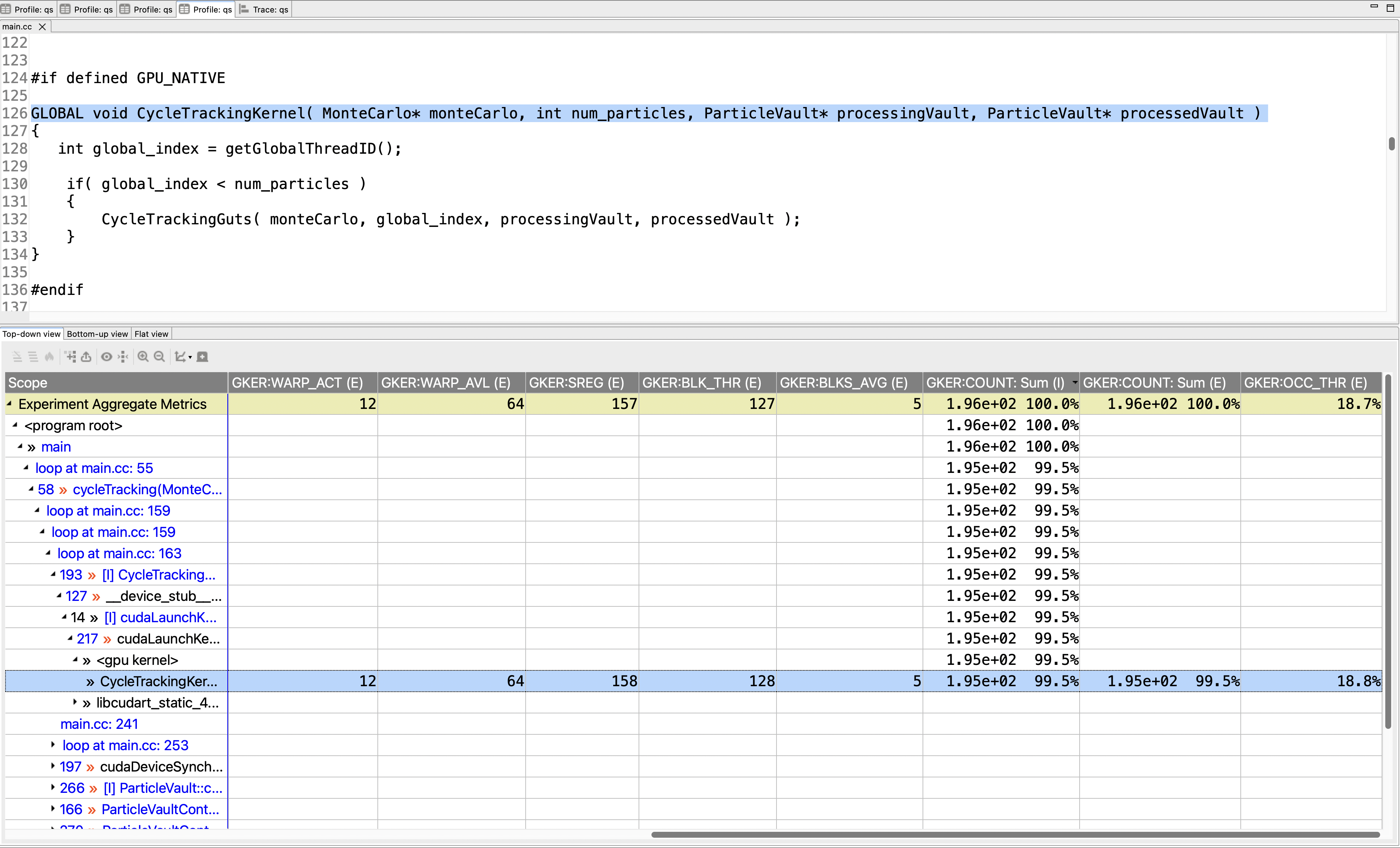
Figure 9.1: A screenshot of hpcviewer for the GPU-accelerated Quicksilver proxy app with kernel metrics.#
Important
The cost of profiling and tracing GPU operations using monitoring libraries provided by GPU vendors can’t be controlled by HPCToolkit. Unlike CPU monitoring based on asynchronous sampling, GPU performance monitoring uses callback interfaces provided by vendor monitoring libraries to monitor the initiation and completion of each GPU operation. Accordingly, the overhead of GPU performance monitoring depends upon how frequently GPU operations are initiated.
For example, when monitoring CUDA applications on NVIDIA GPUs with NVIDIA’s CUPTI interface, we have seen the execution time double when profiling and tracing a GPU-accelerated application that launches kernels very frequently. Measures of GPU activity are accurate; however, processing the torrent of measurement data from one or more GPUs can add considerable CPU overhead. For that reason, you should expect some CPU overhead associated with profiling and tracing of GPU operations and account for it in your analysis.
For instance, if a GPU-accelerated program runs in 1000 seconds without HPCToolkit monitoring GPU activity but slows to 2000 seconds when GPU profiling and tracing is enabled, then if GPU profiles and traces show that the GPU is active for 25% of the execution time, one should mentally re-scale the accurate measurements of GPU activity by considering the 2x dilation that occurs when monitoring GPU activity. Without monitoring, one would expect the same level of GPU activity, but the host time would be twice as fast. Thus, without monitoring, the ratio of GPU activity to host activity would be roughly double.
10.3. Tracing GPU Operations#
HPCToolkit also supports tracing of activities on GPU streams on AMD, Intel, and NVIDIA GPUs when using ROCm, Level Zero, CUDA, OpenCL or OpenMP offloading. Tracing of GPU activities will be enabled any time GPU monitoring is enabled and hpcrun’s tracing is enabled with -t|--trace.
For tracing GPU-accelerated workloads, HPCToolkit offers a better tracing option -tt|--ttrace, which collects a boosted resolution trace of CPU threads.
Like -t, -tt records a call path trace for CPU threads based on asynchronous sampling of a time-based sampling metric,
such as CPUTIME, REALTIME, or cycles.
Unlike -t, -tt also records a sample for a CPU thread as it launches each GPU operation (if any).
Without -tt, the activity seen on a CPU trace line at the time a kernel is launched may be from long ago, which makes it hard to understand how CPU activity relates to GPU activity.
Note that using -tt disturbs the statistical properties of CPU traces since it adds non-sample events whenever a thread launches a GPU operation.
Important
The next section describes instruction-level measurement within GPU kernels using PC sampling. Unless you are using a very large sampling period, collecting and attributing PC samples may add significant CPU overhead to a GPU-accelerated code. You can assess PC sampling overhead by comparing the execution time of a GPU-accelerated code with and without PC sampling. Unless the PC sampling frequency you are using is known to measure executions with low overhead, tracing using either -t or -tt is not recommended when PC sampling is enabled as the overhead of PC sampling will affect timings in traces.
Important
During execution hpcrun creates CPU tool threads to record traces of GPU activities. The work performed by such tool threads is not reported in profiles and traces shown by HPCToolkit. By default, hpcrun creates one tracing thread per 256 GPU streams. To adjust the number of GPU streams per tracing thread, see the settings for HPCRUN_CONTROL_KNOBS in Section 14.
When mapping a GPU-accelerated node program onto a node, you may need to consider provisioning additional hardware threads or cores to accommodate these tracing threads; otherwise, they may compete with application threads for CPU resources, which may degrade the performance of your program.
10.4. PC Sampling on GPUs#
HPCToolkit collects Program Counter (PC) samples to measure instruction-level performance metrics on AMD, Intel and NVIDIA GPUs. Measurement of PC samples is supported for CUDA on NVIDIA GPUs, HIP on AMD GPUs, SYCL/DPC++ on Intel GPUs, and OpenMP on all GPUs. None of the GPU vendors support PC sampling for OpenCL.
All GPU implementations of PC sampling periodically interrupt execution of a kernel warp or wavefront running on a GPU to record the value of its program counter to identify the instruction that an AMD compute unit, an Intel execution unit, or an NVIDIA streaming multiprocessor is trying to execute. HPCToolkit attributes much of the information gathered from sample records in a vendor-neutral way. HPCToolkit also supports instruction-level measurement on Intel GPUs using binary instrumentation.
PC sampling on Intel and NVIDIA GPUs is supported by hardware. AMD GPUs have two strategies for collecting PC samples: one supported entirely in software and one supported by hardware. Each of these implementations collect instruction-level metrics within GPU kernels.
Metrics collected with PC sampling are estimates for two reasons:
First, when sampling with a period of N instructions, each time a sample is recorded, HPCToolkit charges N cycles to the machine instruction indicated by the program counter. This strategy has the advantage that the measurement results should be independent of the sampling period. NVIDIA GPUs and AMD’s hardware-supported stochastic sampling both use sampling periods specified using a number of instructions. When measuring a program using PC sampling, one can specify a sampling period by adding an @k to the end of the argument enabling PC sampling; this will set the sampling period to 2^k.
Second, Intel’s Level Zero runtime and AMD’s software implementation of PC sampling for MI200+ GPUs specify the sampling period as time rather than the number of instructions. Like the aforementioned implementations with instruction-level periods, HPCToolkit’s implementation of PC sampling for Intel GPUs and AMD’s software implementation of PC sampling use @k to indicate a sampling period of 2^k; however, the period for these implementations is in nanoseconds rather than cycles.
For both Intel and AMD GPUs, base clock frequencies are approximately 1GHz. While boosted clock frequencies can be as much as twice as fast, HPCToolkit doesn’t attempt to correct for that. Instead, HPCToolkit treats nanoseconds and clock cycles as interchangeable. Even when using time-based periods, HPCToolkit reports GPU measurements as cycles. With clock scaling, this may be off by as much as a factor of two. However, for the purpose of identifying which source lines within kernels consume resources, metrics will accumulate at the proper locations with the proper relative costs for different locations regardless of whether the metric actually is a measure of GPU cycles or nanoseconds.
When using AMD’s software support for PC sampling, cycles is the only metric that can be collected; when processing a PC sample at runtime, no information is available about whether the sampled instruction issued or stalled. In contrast, hardware support for PC sampling on AMD, Intel, and NVIDIA GPUs reports whether the sampled instruction was issued or whether the sampled instruction stalled instead. All GPU instruction-level metrics measured (e.g. cycles, issues, stalls) are scaled by multiplying the actual count of samples by the sample period.
HPCToolkit considers a PC sample to represent a stall only if the latency of the instruction’s stall is exposed. On an NVIDIA GPU, HPCToolkit only considers a sampled instruction to be a stall if NVIDIA’s CUPTI reports the instruction as a latency sample, which means that no instruction issued on the GPU in the cycle when the sample was recorded. On an AMD GPU, AMD’s Rocprofiler-sdk reports the type of instruction that issued. HPCToolkit only considers an instruction of type T to be an exposed stall if instruction T should issue to pipeline P, and pipeline P did not issue any instruction in the current cycle.
Each of the GPUs report when a sampled instruction is ready to execute but was NOT_SELECTED. HPCToolkit doesn’t generally consider NOT_SELECTED as an exposed stall. An instruction that is NOT_SELECTED stalled only because another instruction is executing instead. When the latency of a stalled instruction is overlapped with execution of another instruction, a developer need not be concerned about the reason for the stall. GPUs are designed to hide the latency of stalled instructions by interleaving the execution of instructions from different warps or wavefronts and overlapping one warp or wavefront’s stall with execution of an instruction from another warp or wavefront.
Besides reporting a summary metric of exposed stalls, HPCToolkit additionally measures and attributes reasons for exposed stalls. HPCToolkit maps stall reasons from AMD, Intel, and NVIDIA GPUs into a (mostly) vendor-neutral taxonomy of stall reasons. To facilitate the interpretation of the myriad of instruction-level metrics that HPCToolkit collects using PC sampling, HPCToolkit presents metrics in the context of a top-down metric hierarchy. Section 9.5 describes HPCToolkit’s support for top-down performance analysis on GPUs.
The next section describes how HPCToolkit attributes metrics to heterogeneous calling contexts that span CPU and GPU.
10.4.1. Attributing PC Samples to Source Code#
Using PC sampling, HPCToolkit attributes GPU metrics to heterogeneous calling contexts that include the CPU calling context in which a GPU kernel was launched as a prefix and measurements within the GPU kernel as the suffix.
When collecting PC samples for a GPU-accelerated applications, GPU runtimes notify hpcrun every time they load a binary into a GPU.
The first time a GPU binary is loaded, hpcrun computes a cryptographic hash of the GPU binary’s contents and records the binary inside a gpubins subdirectory of hpcrun’s measurement directory in a file with a name based on the hex representation of its cryptographic hash, e.g., 984ef7dea.gpubin.
To attribute PC samples collected during an execution of a GPU-accelerated application back to the application’s code, one simply follows the traditional HPCToolkit workflow. Invoking hpcstruct on the execution’s measurement directory analyzes any GPU binaries used in the course of an execution along with the executable and CPU shared libraries. Program structure information recovered by hpcstruct is used to map PC samples associated with machine instructions back to source code.
By default, when applied to a measurements directory, hpcstruct performs only lightweight analysis of the GPU functions in each GPU binary, enabling PC samples to be mapped to functions, loops, and source lines. It is important to understand that AMD, Intel, and NVIDIA GPU measurement APIs for PC sampling collect “flat” PC samples without any information about GPU call stacks.
In our experience, calling contexts within GPU kernels are essential for developers to understand the performance of sophisticated kernels that employ many device functions. The GPU-accelerated Quicksilver proxy application from Lawrence Livermore National Laboratory illustrates this problem. Figure 9.2 shows a screenshot of hpcviewer displaying PC sampling measurements for Quicksilver without reconstruction of a calling context tree within CycleTrackingKernel. The figure shows a top-down view of heterogeneous calling contexts that span both CPU and GPU. In the middle of the figure is a placeholder <gpu kernel> that is inserted by HPCToolkit to mark the transition between CPU and GPU code in the call stack. Above the placeholder is a CPU calling context where the GPU kernel was invoked. Below the <gpu kernel> placeholder, hpcviewer shows more than a dozen GPU device functions that were executed on behalf of CycleTrackingKernel.
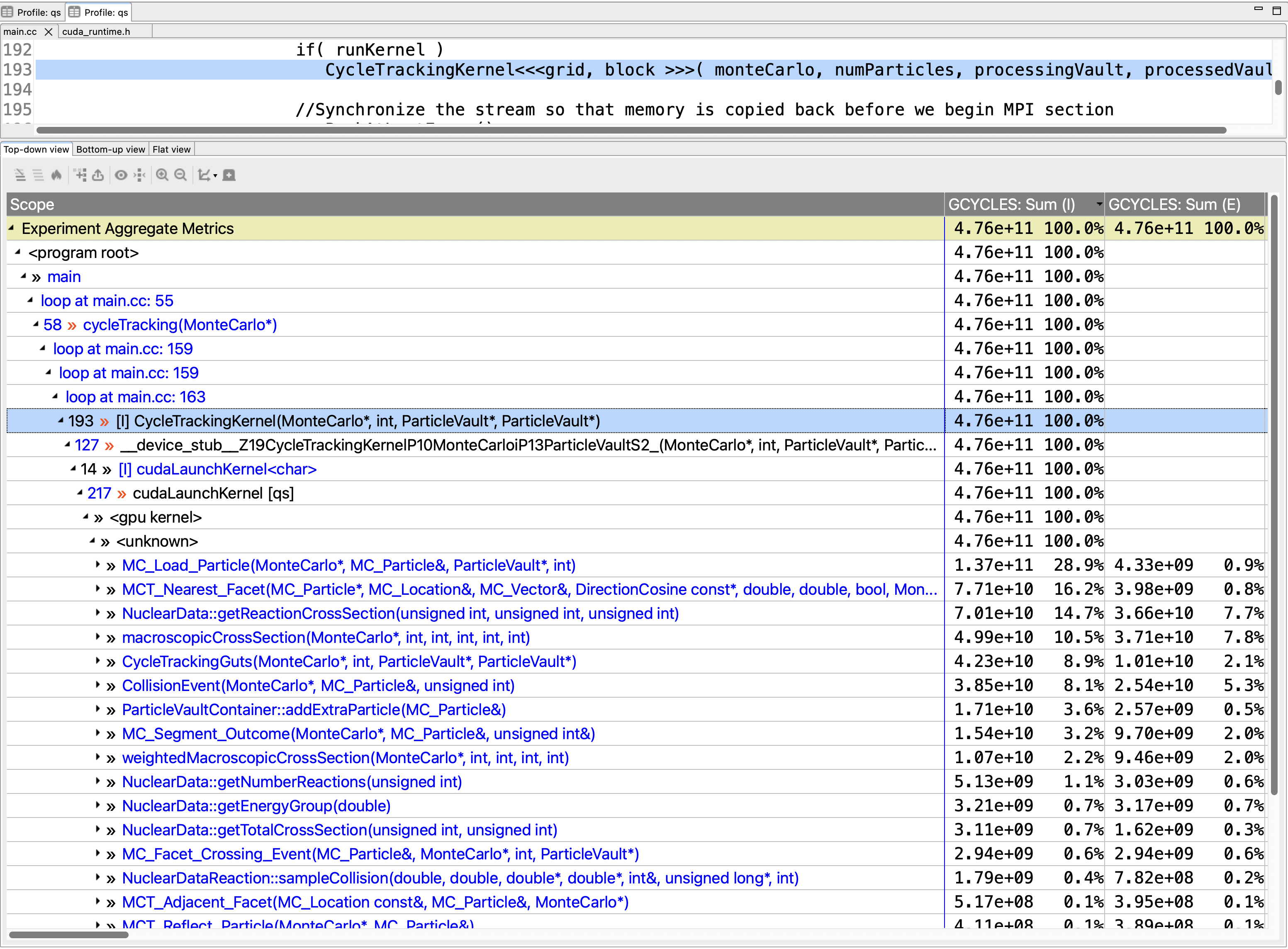
Figure 9.2: A screenshot of hpcviewer for the GPU-accelerated Quicksilver proxy app without GPU CCT reconstruction.#
Since GPU measurement APIs don’t provide information about device-function call stacks within GPU kernels for PC samples, we designed a method to reconstruct GPU calling contexts during post-mortem analysis. This analysis is only performed when (1) an execution has been monitored using PC sampling, and (2) the measurement directory containing an execution’s GPU binaries has been analyzed in detail by invoking hpcstruct on the directory with the option --gpucfg yes. Reconstructing calling contexts within GPU kernels is optional because it may be expensive for kernels with large calling context trees.
To reconstruct calling context trees for GPU computations, HPCToolkit uses information about call sites identified by hpcstruct in conjunction with PC samples measured for each call instruction in a GPU binary.
Apportioning costs among two or more calls to the same device function in a GPU calling context is a heuristic process. Without the ability to measure each device function invocation, HPCToolkit assumes that each invocation of a particular device function incurs the same costs. The costs of each device function are apportioned among its caller or callers using the following rules:
If a device function G can only be invoked from a single call site, all of the measured cost of G will be attributed to its single call site.
If a device function G can be called from multiple call sites and PC samples have been collected for one or more of the call instructions for G, the costs for G are proportionally divided among G’s call sites according to the distribution of PC samples for calls that invoke G. For instance, consider the case where there are three call sites where G may be invoked, 5 samples are recorded for the first call instruction, 10 samples are recorded for the second call instruction, and no samples are recorded for the third. In this case, HPCToolkit divides the costs for G among the first two call sites, attributing 5/15 of G’s costs to the first call site and 10/15 of G’s costs to the second call site.
If no call instructions for a device function G have been sampled, the costs of G are apportioned evenly among each of G’s call sites.
HPCToolkit’s hpcprof analyzes the static call graph associated with each GPU kernel. If the static call graph for a GPU kernel contains cycles, which arise from recursive or mutually-recursive calls, hpcprof replaces each cycle with a strongly connected component (SCC). In this case, hpcprof unlinks call graph edges between vertices within the SCC and adds an SCC vertex to enclose the set of vertices in each SCC. The rest of hpcprof’s analysis treats an SCC vertex in the call graph like a device function. The process of reconstructing calling context trees for GPU kernels using static call sites and sample counts is described elsewhere.
Figure 9.3 shows an hpcviewer screenshot for the GPU-accelerated Quicksilver code following reconstruction of GPU calling contexts. Notice that after the reconstruction, one can see that CycleTrackingKernel calls CycleTrackingGuts, which calls CollisionEvent, which eventually calls macroscopicCrossSection and NuclearData::getNumberOfReactions. The the rich GPU calling context tree reconstructed by hpcprof also shows loop nests and inlined code.
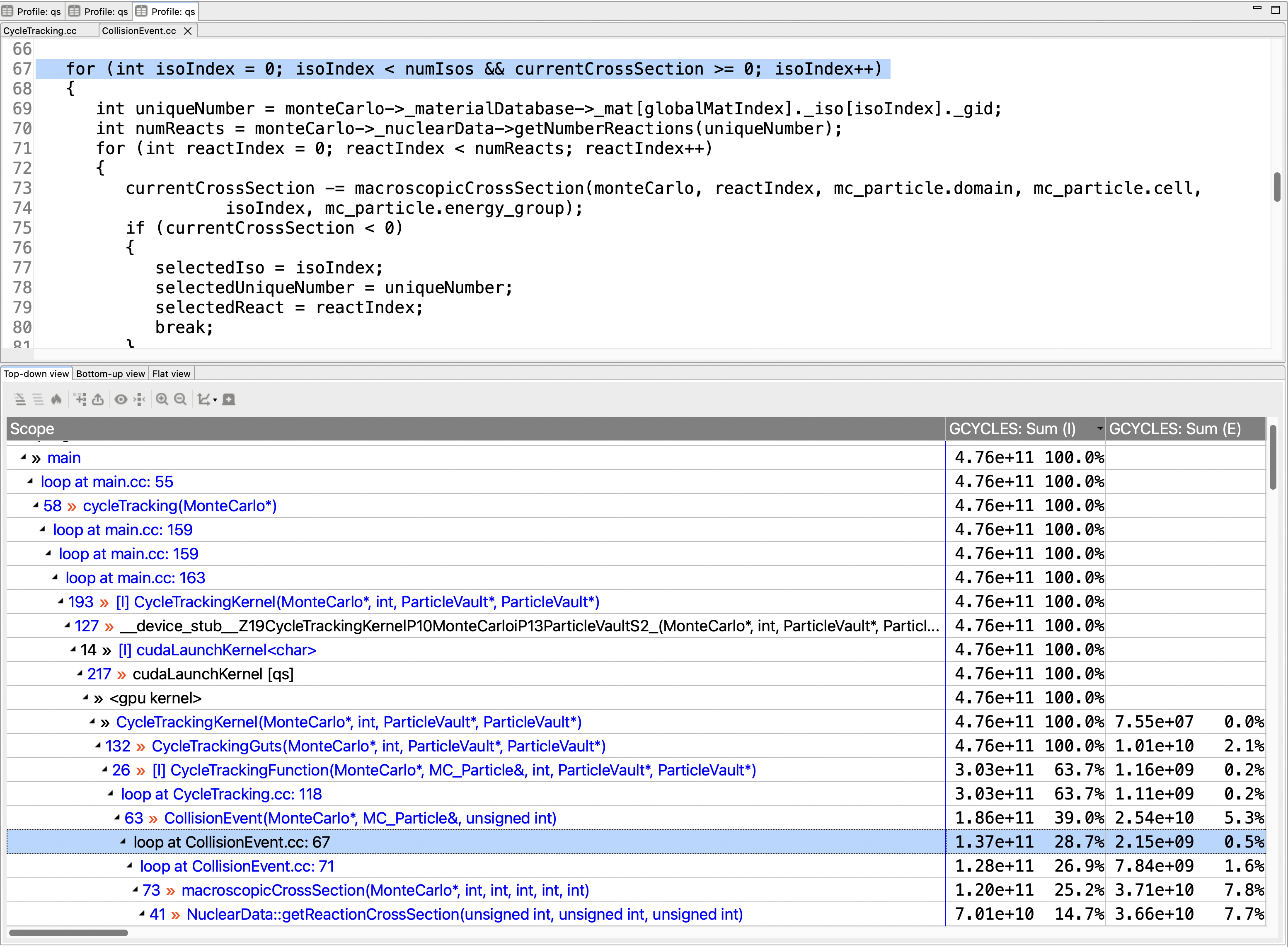
Figure 9.3: A screenshot of hpcviewer for the GPU-accelerated Quicksilver proxy app with GPU CCT reconstruction.#
Tip
If all PC samples in a kernel map to line 0, it is likely that the GPU binaries used by your application don’t contain line mapping information. Consult the appropriate GPU-specific section below for information about the compiler option required to record line mappings that you need for performance analysis.
10.5. GPU Top-down Analysis#
Inspired by Intel’s top-down method for microarchitectural performance analysis on CPUs, HPCToolkit organizes instruction-level measurements of GPU kernels collected using PC sampling into a top-down hierarchy based on GPU instruction stall reasons. HPCToolkit constructs a top-down hierarchy automatically whenever a developer uses PC samples to measure an execution of a GPU-accelerated application.
HPCToolkit’s top-down hierarchy classifies every GPU cycle estimated using PC sampling, enabling a developer to begin with a whole-execution profile view of the breakdown of how GPU cycles were spent. As we explain below, a developer can use HPCToolkit’s support for top-down analysis of GPU execution costs to examine the breakdown of GPU cycles at any level of an execution’s heterogeneous calling contexts, including the whole program, a callsite, a CPU function, a GPU kernel, a loop, an inlined function, or an individual source line in a GPU kernel.
Tip
Top-down analysis of GPU kernels reports the breakdown of cycles when a GPU is active. The breakdown of cycles in a kernel is only important if
one or more GPUs are active for a significant fraction of a program’s execution,
the program spends a significant fraction of its execution time in the kernel, and
the latency of the kernel’s execution is exposed, i.e. not fully overlapped with the execution of code on a CPU.
If these conditions are not met, tuning efforts that increase the fraction of the program’s execution in which the GPU is active are likely to be more effective. Traces are often helpful for gaining insight into what is happening on CPU cores when GPUs are idle.
10.5.1. Metrics Hierarchy#
At the root of HPCToolkit’s top-down hierarchy for GPU analysis is GPU Cycles – the total GPU cycles estimated using PC sampling. Each cycle is classified into one of three top-level categories:
Issues: Cycles in which a sampled instruction issued. On AMD GPUs, hardware-based stochastic sampling (described in section Section 9.6.1.1) reports the type of instruction issued (e.g., compute, memory, communication, control flow, or synchronization). In this case, HPCToolkit classifies instruction issues by instruction type.
Hidden Stalls: Cycles in which a sampled instruction stalled but its latency was hidden because another instruction issued in the same cycle. Hidden stalls represent instructions that were ready to execute but were not selected in favor of another instruction. Hidden stalls are not evidence of a performance problem because GPUs are designed to hide latencies of stalled instructions by overlapping them with the execution of instructions from other warps or wavefronts.
Exposed Stalls: Cycles in which a sampled instruction stalled and no other instruction issued to hide its latency. Exposed stalls represent lost pipeline cycles. These are subdivided by stall reasons to indicate their causes.
HPCToolkit’s full top-down hierarchy for GPUs is shown in Figure 9.4. On any particular GPU, HPCToolkit reports only the subset of the hierarchy that can be measured or synthesized.
GPU Cycles
├── Issues
│   ├── Compute
│   │   ├── Vector
│   │   │   ├── Matrix
│   │   │   ├── Dual
│   │   │   └── Single
│   │   └── Scalar
│   ├── Memory
│   │   ├── Flat
│   │   ├── LDS
│   │   ├── LDS Direct
│   │   └── Texture
│   ├── Communication
│   │   ├── Message
│   │   └── Export
│   ├── Control Flow
│   │   ├── Jump
│   │   └── Branch
│   │       ├── Taken
│   │       └── Not Taken
│   ├── Synchronization
│   └── Other
├── Exposed Stalls
│   ├── Front End Stalls
│   │   └── Instruction Fetch Stalls
│   └── Back End Stalls
│       ├── Compute Stalls
│       │   └── Instruction Dependence Stalls
│       ├── Memory Stall
│       │   ├── Latency Stalls
│       │   │   ├── Global Memory Stalls
│       │   │   ├── Constant Memory Stalls
│       │   │   └── Texture Memory Stalls
│       │   └── Request Issue Stalls
│       │       ├── Flat Request Issue Stalls
│       │       ├── Texture Request Issue Stalls
│       │       └── LDS Request Issue Stalls
│       ├── Resource Stalls
│       │   ├── Branch Unit Stalls
│       │   └── Pipeline Stalls
│       ├── Synchronization Stalls
│       └── Miscellaneous Stalls
│           ├── Internal Instruction Stalls
│           ├── Sleep Stalls
│           └── Other Stalls
└── Hidden Stalls
    ├── Not Selected
    └── Other Hidden
Figure 9.4 The top-down hierarchy of GPU metrics used by HPCToolkit.
The mapping of measurements onto the hierarchy is vendor specific because AMD, Intel, and NVIDIA GPUs report different information (e.g. stall reasons, pipeline status, activity mask) with each PC sample. Leaves of the hierarchy typically correspond to metrics measured using PC sampling, such as the issue and stall metrics described in Section 9.4. Sometimes, metrics at leaves are synthesized from measured metrics, as we describe below. Typically, the value of an interior node is computed as the sum of the values of its children. In other cases, it is measured or synthesized directly when no breakdown of its cost is available. Below, we describe how HPCToolkit computes the values of key top-down metrics for GPUs by different vendors.
On NVIDIA and Intel GPUs, issued instructions are reported only in aggregate under Issues. In contrast, stochastic sampling on AMD GPUs reports the type of each issued instruction, so any issue can be classified and reported in a subcategory of compute, memory access, communication, or control flow.
On AMD and Intel GPUs, memory latency stalls are reported only in aggregate under memory Latency Stalls because there is no information about the kind of access whose response is being awaited. In contrast, NVIDIA GPUs attribute a memory latency stall to global memory, constant memory, or texture memory.
HPCToolkit attributes
SENDstalls on Intel GPUs andMEMORY THROTTLINGstalls on NVIDIA GPUs as Request Issue Stalls. However, AMD GPUs lack any stall reason that corresponds to Request Issue Stalls. HPCToolkit handles this by synthesizing Request Issue Stalls by integrating information about instruction types and stalls for various pipelines associated with memory accesses.Instruction type information in a PC sample on an AMD GPU indicates whether a memory access instruction will access flat memory, texture memory, or local data store (LDS). The pipeline on which a memory access instruction will be dispatched is a function of the kind of memory it will access.
HPCToolkit reports a
PIPE BUSYstall for a memory access instruction A as a subtype of Request Issue Stalls based on the kind of memory being accessed by A.HPCToolkit also reports a
NOT SELECTEDmemory access instruction A as a memory request issue stall if another memory access B attempted to issue to the pipeline associated with A but the pipeline stalled. In this case, the pipeline associated with A is stalled and the latency of A’s stall is not being hidden by B’s execution because B is stalled as well.
Important
AMD, Intel and NVIDIA GPUs each may report a stall reason of NOT SELECTED for a sampled instruction.
This indicates that one or more other instructions were selected for execution instead.
Since GPUs are designed to use multithreading to hide instruction stalls, instruction stalls that are overlapped with execution of other instructions are often not of interest.
To help users avoid being needlessly concerned about NOT SELECTED stalls, HPCToolkit typically reports such stalls as Hidden Stalls.
It is important to note that HPCToolkit computes hidden stalls differently on Intel and NVIDIA GPUs than it does on AMD GPUs.
On Intel and NVIDIA GPUs, HPCToolkit classifies a cycle as a hidden stall whenever the GPU reports a stall reason NOT SELECTED for the sampled instruction.
On AMD GPUs, stochastic PC samples include information about the state of individual GPU instruction pipelines (e.g., scalar, vector, flat memory). HPCToolkit uses this pipeline state information to assess whether an instruction that is not selected should be considered a hidden stall or not. Specifically, on an AMD GPU, HPCToolkit only considers a cycle as a hidden stall when two conditions are satisfied
the sampled instruction with a stall reason
NOT SELECTEDmaps to a particular pipelineP(e.g. vector), andanother instruction associated with pipeline
Pwas selected for execution.
Thus, on AMD GPUs HPCToolkit only considers a NOT SELECTED stall for a sampled instruction associated with pipeline P as hidden if another instruction issued on pipeline P in the same cycle.
The top-down hierarchy turns raw stall information reported by GPU hardware into actionable guidance. Two examples:
A large fraction of cycles attributed to memory Request Issue Stalls often indicates that memory accesses are not being coalesced. Accesses are coalesced only when adjacent threads access adjacent memory locations. To improve coalescing, ensure that
threadIdx.x(CUDA or HIP),get_local_id(0)(OpenCL or SYCL), orteam_rank()(Kokkos) is used as the innermost array index.If Scalar issues dominate Vector issues on an AMD GPU, wavefronts are spending more issue slots updating index variables, performing address arithmetic, evaluating predicates, and issuing uniform operations than performing vectorized computation.
10.5.2. Presentation#
In hpcviewer, the top-down metric hierarchy showing the breakdown of GPU Cycles is visualized using a donut chart. When you open the profile view of a performance database containing instruction-level measurements of GPU cycles collected using hardware support for PC sampling, hpcviewer displays a donut chart that represents the breakdown of GPU cycles in the program execution along with a tree-based representation of the top-down metric hierarchy. Figure 9.5 shows an example of a GPU Cycles donut chart visualization for a sample profile.
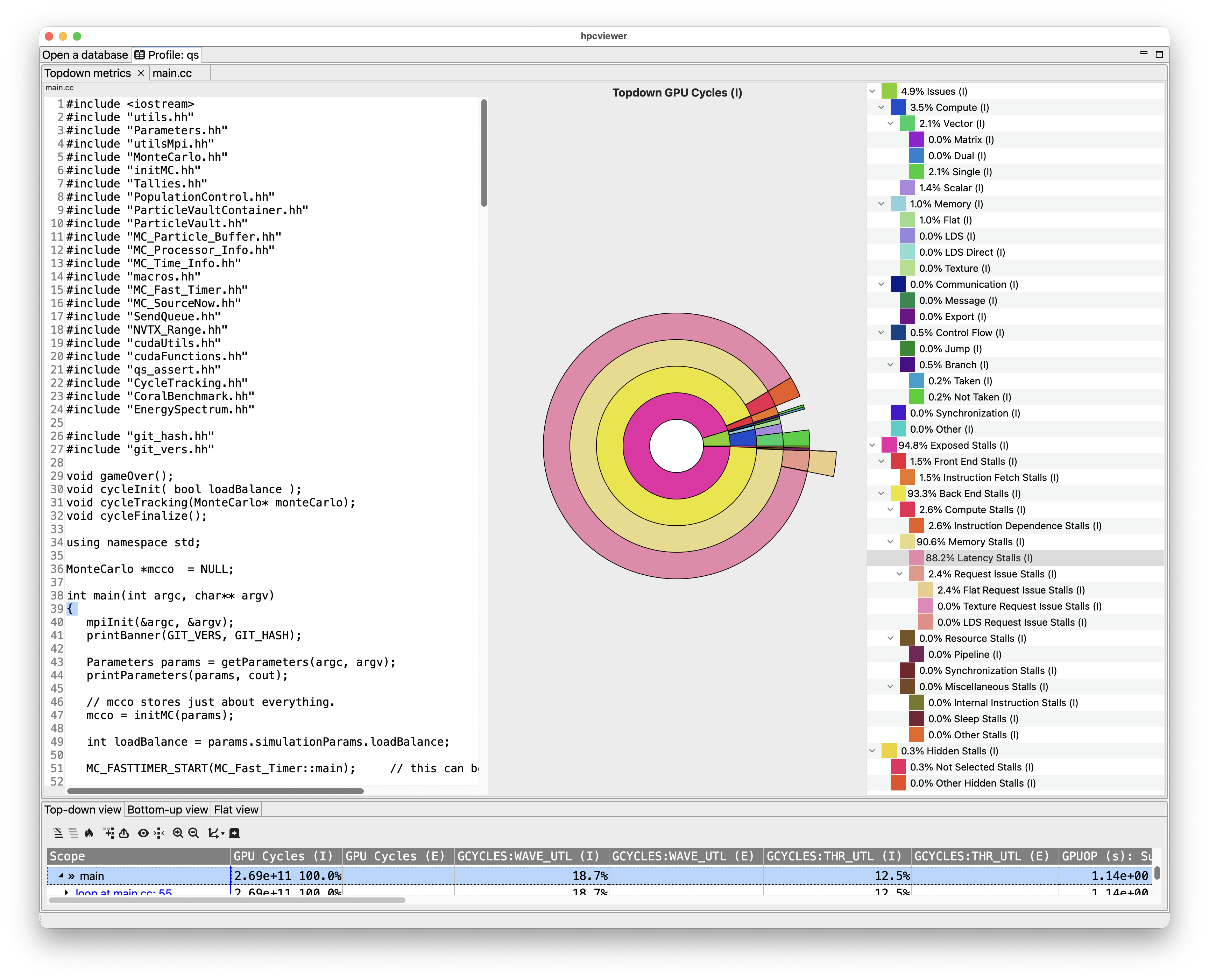
Figure 9.5: An screenshot of hpcviewer showing donut-chart and tree-based representation of GPU Cycles for measurements of an application on an AMD MI300A.#
As shown in Figure 9.5, the circle at the center of the initial donut chart represents the root GPU Cycles metric. The innermost ring of the donut chart represents the children of the metric at the graph’s center. Each subsequent ring represents the children of the metrics in the ring it encloses. Child metrics in a ring occupy the same arc as their parent metric in the ring it encloses. In the tree-based representation of the metric hierarchy, each node in the tree contains a metric name and the percentage of the total GPU cycles associated with the metric.
Selecting any cell in an inclusive or exclusive GPU Cycles column of hpcviewer’s metric pane will
refresh the top-down metrics pane to show the breakdown of GPU cycles for the scope represented by
the line containing the selected cell.
Section 11.2.1.4 describes how to explore the data presented by the top-down metric hierarchy in hpcviewer’s top-down pane.
10.5.3. A Case Study#
As a concrete example of the utility of top-down analysis, consider Minimod, a seismic modeling kernel that applies a star-shaped 25-point stencil to a 3D array.
Figure 9.6 shows an annotated hpcviewer screenshot of top-down measurements of a HIP implementation of Minimod on an AMD MI300A (synthesized by Claude Sonnet) collected using stochastic PC sampling.
HPCToolkit’s top-down hierarchy attributes 91% of the GPU cycles spent in the stencil kernel to exposed stalls that occur while attempting to issue flat memory accesses. Such an overwhelming fraction of memory issue request stalls can be a sign that memory accesses are not being coalesced. Inspection of the kernel’s indexing confirmed that values derived from threadIdx.x were not used to index the innermost dimension of the arrays, which causes uncoalesced accesses.
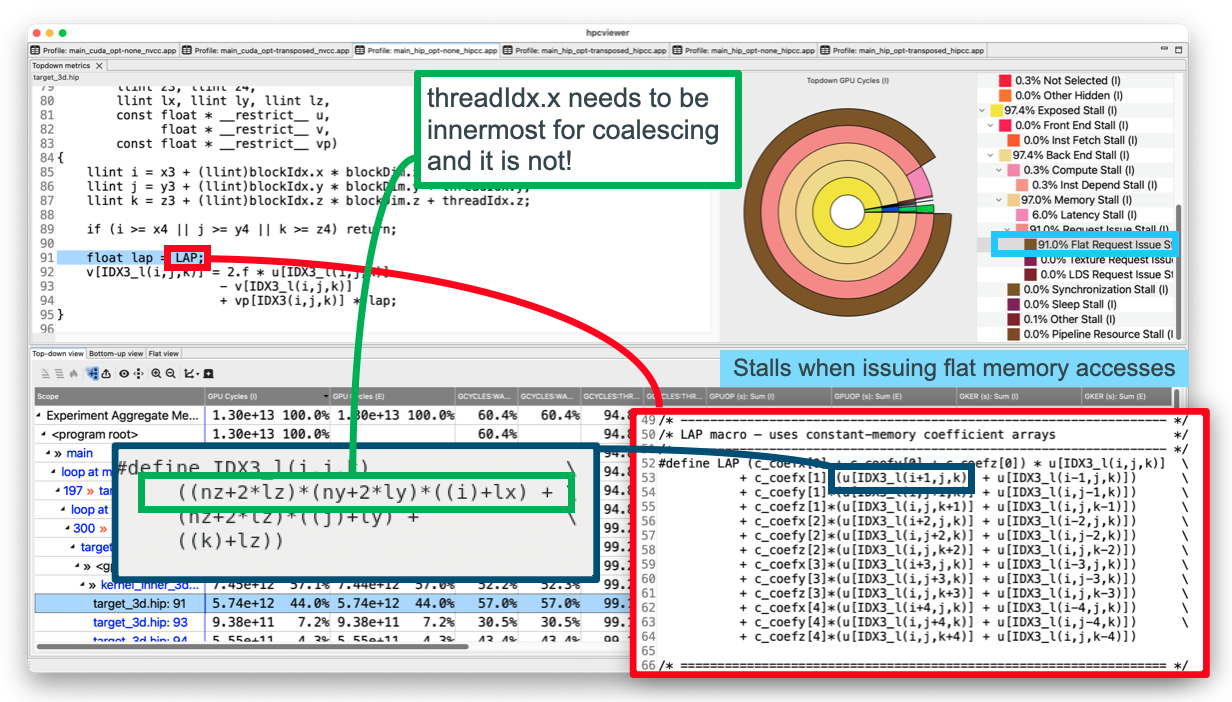
Figure 9.6: An annotated screenshot of hpcviewer showing top-down measurements of Minimod’s stencil kernel on an AMD MI300A.
Most GPU cycles are exposed stalls when issuing flat memory accesses, a sign that memory accesses are not coalesced.#
Figure 9.7 shows top-down measurements of a transposed variant of the kernel that indexes the innermost dimension with values derived from threadIdx.x. The transposed variant dramatically reduced memory request issue stalls and ran over 6x faster.
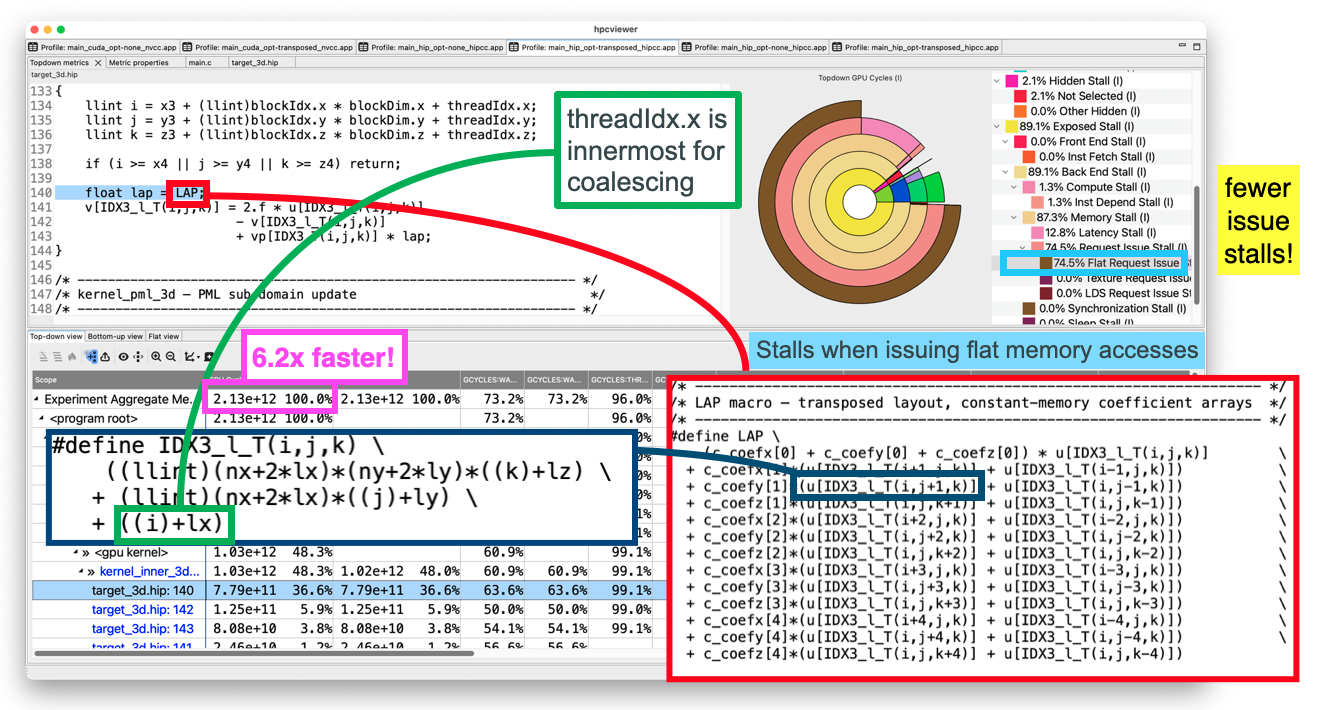
Figure 9.7: An annotated screenshot of hpcviewer showing top-down measurements of a transposed variant of Minimod’s stencil kernel on an AMD MI300A. With coalesced memory accesses, memory request issue stalls dropped dramatically and the kernel ran over 6x faster.#
10.5.4. Inspecting Metrics#
By default, hpcviewer only displays GPU Cycles - the root of the top-down metric hierarchy - as a column in its metric pane.
If desired, columns for other metrics in the top-down hierarchy can be displayed.
Figure 9.8 shows a version of the top-down GPU metric hierarchy in which each metric is annotated with a name that encodes its position in the hierarchy. Displaying a metric column using the name that encodes its position in the hierarchy makes it easier to remember what a metric column represents.
GPU Cycles (GCYCLES)
├── Issues (GCYCLES:ISU)
│   ├── Compute (GCYCLES:ISU:COMP)
│   │   ├── Vector (GCYCLES:ISU:COMP:VECT)
│   │   │   ├── Matrix (GCYCLES:ISU:COMP:VECT:MATR)
│   │   │   ├── Dual (GCYCLES:ISU:COMP:VECT:DUAL)
│   │   │   └── Single (GCYCLES:ISU:COMP:VECT:SGL)
│   │   └── Scalar (GCYCLES:ISU:COMP:SCLR)
│   ├── Memory (GCYCLES:ISU:MEM)
│   │   ├── Flat (GCYCLES:ISU:MEM:FLAT)
│   │   ├── LDS (GCYCLES:ISU:MEM:LDS)
│   │   ├── LDS Direct (GCYCLES:ISU:MEM:LDSD)
│   │   └── Texture (GCYCLES:ISU:MEM:TEX)
│   ├── Communication (GCYCLES:ISU:COMM)
│   │   ├── Message (GCYCLES:ISU:COMM:MESG)
│   │   └── Export (GCYCLES:ISU:COMM:XPRT)
│   ├── Control Flow (GCYCLES:ISU:CFLOW)
│   │   ├── Jump (GCYCLES:ISU:CFLOW:JMP)
│   │   └── Branch (GCYCLES:ISU:CFLOW:BR)
│   │       ├── Taken (GCYCLES:ISU:CFLOW:BR:TKN)
│   │       └── Not Taken (GCYCLES:ISU:CFLOW:BR:NTKN)
│   ├── Synchronization (GCYCLES:ISU:SYNC)
│   └── Other (GCYCLES:ISU:OTHR)
├── Exposed Stalls (GCYCLES:STL)
│   ├── Front End Stalls (GCYCLES:STL:FE)
│   │   └── Instruction Fetch Stalls (GCYCLES:STL:FE:IFET)
│   └── Back End Stalls (GCYCLES:STL:BE)
│       ├── Compute Stalls (GCYCLES:STL:BE:COMP)
│       │   └── Instruction Dependence Stall (GCYCLES:STL:BE:COMP:IDEP)
│       ├── Memory Stall (GCYCLES:STL:BE:MEM)
│       │   ├── Latency Stalls (GCYCLES:STL:BE:MEM:LAT)
│       │   │   ├── Global Memory Stalls (GCYCLES:STL:BE:MEM:LAT:GMEM)
│       │   │   ├── Constant Memory Stalls (GCYCLES:STL:BE:MEM:LAT:CMEM)
│       │   │   └── Texture Memory Stalls (GCYCLES:STL:BE:MEM:LAT:TMEM)
│       │   └── Request Issue Stalls (GCYCLES:STL:BE:MEM:REQ)
│       │       ├── Flat Request Issue Stalls (GCYCLES:STL:BE:MEM:REQ:FLAT)
│       │       ├── Texture Request Issue Stalls (GCYCLES:STL:BE:MEM:REQ:TEX)
│       │      └── LDS Request Issue Stalls (GCYCLES:STL:BE:MEM:REQ:LDS)
│       ├── Resource Stalls (GCYCLES:STL:BE:RES)
│       │   ├── Branch Unit Stalls (GCYCLES:STL:BE:RES:BUNIT)
│       │   └── Pipeline Stalls (GCYCLES:STL:BE:RES:PIPE)
│       ├── Synchronization Stalls (GCYCLES:STL:BE:SYNC)
│       └── Miscellaneous Stalls (GCYCLES:STL:BE:MISC)
│           ├── Internal Instruction Stalls (GCYCLES:STL:BE:MISC:INT)
│           ├── Sleep Stalls (GCYCLES:STL:BE:MISC:SLP)
│           └── Other Stalls (GCYCLES:STL:BE:MISC:OTHR)
└── Hidden Stalls (GCYCLES:HSTL)
    ├── Not Selected (GCYCLES:HSTL:NSEL)
    └── Other Hidden (GCYCLES:HSTL:OTHR)
Figure 9.8: The top-down hierarchy of GPU metrics annotated with names that encode their position in the hierarchy.
By clicking on hpcviewer’s metric display control icon one show any hierarchically-named metric in Figure 9.8 that is available in a database by adding a check mark next to the metric that you want to show.
In the metric pane, hpcviewer displays the measured value of a top-down metric for each scope along with the percentage that value represents relative to the total value of that metric measured in the execution. The percentage associated with a metric for a scope in the metric pane is incomparable to the percentage for that metric rendered for the scope in its top-down donut chart and tree representations. In the top-down donut chart and tree, the percentage shown for any of the scope’s top-down metrics is relative to the aggregate GPU cycles measured for the program scope.
10.5.5. Under the Hood#
For those interested in how the top-down hierarchy is implemented in an architecture-independent fashion, the tree is described by gpu_topdown_info – a vector of mt_node_info_t structures – defined in src/hpcrun/gpu/gpu-metrics.c.
Each entry in the table indicates its parent (if any); the root GPU Cycles entry has no parent.
Descriptions associated with stall reasons in the top-down hierarchy are defined in the gpu_topdown_help table also in src/hpcrun/gpu/gpu-metrics.c.
The two tables are related by the type code in the index field of each structure.
At runtime, when PC sampling is enabled, hpcrun links the raw metrics available on the GPU being measured into the corresponding nodes of the hierarchy, binds a derived metric to each interior node that sums the metrics of its children, and elides any subtree for which no measurements are available.
10.6. Vendor-specific Details#
10.6.1. AMD GPUs#
On AMD GPUs, HPCToolkit supports coarse-grain profiling of GPU-accelerated applications that offload GPU computation using AMD’s HIP programming model, OpenMP, and OpenCL. In this section, we focus on a few important details about monitoring applications on AMD GPUs with AMD’s new Rocprofiler-sdk.
10.6.1.1. AMD PC Sampling#
AMD GPUs support two kinds of PC sampling: host-trap (software-based) sampling and stochastic (hardware-based) sampling. Support for host-trap based PC sampling first became available with ROCm 6.4 and is available on AMD GPUs MI200 and newer. Support for stochastic sampling first became available with ROCm 7.0 and it requires hardware support that first became available with AMD’s MI300 series. Both kinds of sampling need the GPU to be running modern firmware.
You can check whether one or both kinds of PC sampling are available for your GPUs with AMD’s rocprofv3-avail utility. Running rocprofv3-avail info --pc-sampling will report the list of PC sampling configurations supported for each GPU agent in your system.
Tip
If neither form of PC sampling is available, your GPU is an MI200+, and ROCm 6.4+ is installed, you might want to discuss with your system administrator whether PC sampling can be made available with a firmware update. Some information about what firmware versions are necessary or recommended for PC sampling on various GPU versions can be found in the Rocprofiler-sdk documentation. If you don’t find what you need for your GPU, check with AMD by submitting a Github issue for AMD’s documentation.
PC sampling on AMD GPUs is a device-wide activity for both host-trap (software-based) sampling and stochastic (hardware-based) sampling.
When using host-trap (software-based) PC sampling, a background thread periodically interrupts running waves on a GPU to read the program counter. Samples collected using host-trap sampling may suffer from “skid”, where a sample may be attributed to an instruction up to two instructions away from a source of latency. As described in AMD’s documentation about host-trap sampling, one must be careful interpreting host-trap PC samples because the costly instructions may be nearby rather than the ones where costs are attributed.
When using stochastic (hardware-based) PC sampling, each compute unit periodically chooses an active wave on the compute unit and records its PC. Over time, each compute unit samples waves in a round robin fashion.
To select software-based host-trap PC sampling, specify -e gpu=rocm,pc=sw.
To select hardware-based stochastic PC sampling, specify -e gpu=rocm,pc=hw.
Specifying simply -e gpu=rocm,pc will default to software-based host-trap sampling.
Periods for hardware stochastic sampling are measured in GPU cycles and the minimum is 256; periods must be a power of 2. HPCToolkit’s default period for AMD stochastic sampling is currently set to 2^20 cycles. HPCToolkit enables a user to specify the desired period by adding an @k to the end of a PC sampling specification, e.g. -e gpu=rocm,pc=hw@22 will set the period for stochastic sampling to 2^22 cycles.
Periods for host-trap based sampling are measured in microseconds. The minimum period is 1 us, which HPCToolkit enforces as 2^10 ns. HPCToolkit’s default period for AMD host-trap sampling is set to 2^20 ns.
Using -e gpu=rocm,pc=sw@21 will set the period for software-based host-trap sampling to 2^21 ns.
Important
At present, setting the sampling period for hw PC sampling to a period significantly shorter than 2^20 has been observed to cause AMD’s driver to fail. As a result, HPCToolkit uses the AMD-recommended default PC sampling period of 2^20 cycles for stochastic sampling.
For both kinds of sampling, HPCToolkit reports GPU cycles (GCYCLES). The default frequency for AMD GPUs is approximately 1GHz, so 1 cycle is approximately 1 ns. While frequency adjustments may affect the GPU clock, assuming that the frequency is constant at 1GHz should be sufficient for measurements to be adequate for performance tuning.
AMD’s stochastic sampling hardware records a wealth of information with each PC sample. A sampled instruction will either issue or not. In most cases, the stochastic sampling hardware in an AMD MI300 reports the kind of a wavefront’s sampled instruction. Table 9.12 shows the kinds of issued instructions that the MI300 tracks and reports. In some cases, a wavefront’s instruction may not be known if the wavefront is stalled fetching the next instruction after a branch.
Metric |
Description |
|---|---|
GCYCLES:ISU:COMP:VECT:MATR |
GPU issue cycles: issued a sampled matrix instruction |
GCYCLES:ISU:COMP:VECT:DUAL |
GPU issue cycles: issued dual vector instructions |
GCYCLES:ISU:COMP:VECT:SGL |
GPU issue cycles: issued a sampled vector instruction |
GCYCLES:ISU:COMP:SCLR |
GPU issue cycles: issued a sampled scalar instruction |
GCYCLES:ISU:MEM:TEX |
GPU issue cycles: issued a sampled texture instruction |
GCYCLES:ISU:MEM:LDS |
GPU issue cycles: issued a sampled Local Data Store instruction |
GCYCLES:ISU:MEM:LDSD |
GPU issue cycles: issued a sampled Local Data Store direct instruction |
GCYCLES:ISU:MEM:FLAT |
GPU issue cycles: issued a sampled flat instruction |
GCYCLES:ISU:COMM:XPRT |
GPU issue cycles: issued a sampled export instruction |
GCYCLES:ISU:COMM:MESG |
GPU issue cycles: issued a sampled message instruction |
GCYCLES:ISU:SYNC:BAR |
GPU issue cycles: issued a sampled barrier instruction |
GCYCLES:ISU:CFLOW:BR:TKN |
GPU issue cycles: issued a sampled taken branch instruction |
GCYCLES:ISU:CFLOW:BR:NTKN |
GPU issue cycles: issued a sampled not taken branch instruction |
GCYCLES:ISU:CFLOW:JMP |
GPU issue cycles: issued a sampled jump instruction |
GCYCLES:ISU:OTHR |
GPU issue cycles: issued a sampled ‘other’ instruction |
AMD GPUs support multiple execution pipelines and multiple instruction issue. As a result, more than one pipeline may report an issue in a cycle. AMD’s stochastic sampling hardware tracks all instructions that issue in a sampled cycle, not just the sampled instruction. Different models of AMD GPUs may have different pipelines. HPCToolkit reports AMD GPU pipeline issues with a separate metric for each GPU pipeline, as shown in Table 9.13. Note that the matrix pipeline is only used for matrix instructions on low-precision numbers. Matrix operations on 32 or 64-bit numbers issue to the vector pipeline.
Metric |
Description |
|---|---|
GPIPE:ISU:MATR |
GPU pipeline issue status: low precision matrix operation |
GPIPE:ISU:DUAL |
GPU pipeline issue status: dual vector dual |
GPIPE:ISU:SGL |
GPU pipeline issue status: single vector vector |
GPIPE:ISU:SCLR |
GPU pipeline issue status: scalar ALU or memory |
GPIPE:ISU:LDS |
GPU pipeline issue status: Local Data Store |
GPIPE:ISU:LDSD |
GPU pipeline issue status: Local Data Store direct |
GPIPE:ISU:TEX |
GPU pipeline issue status: texture |
GPIPE:ISU:FLAT |
GPU pipeline issue status: flat |
GPIPE:ISU:XPRT |
GPU pipeline issue status: export |
GPIPE:ISU:BMSG |
GPU pipeline issue status: branch or message |
GPIPE:ISU:MISC |
GPU pipeline issue status: miscellaneous |
A GPU pipeline may stall waiting for resources that are not available in the current cycle, e.g., register ports. HPCToolkit reports AMD GPU pipeline stalls with a separate metric for each GPU pipeline, as shown in Table 9.14. By comparing issue and stall counts with the GCYCLES metric, one can compute the fraction of cycles in which each pipeline issues, stalls, or is idle.
Metric |
Description |
|---|---|
GPIPE:STL:MATR |
GPU pipeline stall status: low precision matrix operation |
GPIPE:STL:DUAL |
GPU pipeline stall status: dual vector |
GPIPE:STL:SGL |
GPU pipeline stall status: single vector |
GPIPE:STL:SCLR |
GPU pipeline stall status: scalar ALU or memory |
GPIPE:STL:LDS |
GPU pipeline stall status: Local Data Store |
GPIPE:STL:LDSD |
GPU pipeline stall status: Local Data Store direct |
GPIPE:STL:TEX |
GPU pipeline stall status: texture |
GPIPE:STL:FLAT |
GPU pipeline stall status: flat |
GPIPE:STL:XPRT |
GPU pipeline stall status: export |
GPIPE:STL:BMSG |
GPU pipeline stall status: branch or message |
GPIPE:STL:MISC |
GPU pipeline stall status: miscellaneous |
Computation on AMD’s GPUs is organized as ROCm wavefronts (also know as HIP warps - WRP in Table 9.5). AMD GPUs hide latency by overlapping stalls of one wavefront with the execution of another. Having multiple wavefronts available to schedule is important for hiding latency. On AMD GPUs, HPCToolkit measures how many wavefronts are active on a compute unit (CU) in each sampled cycle and computes the measured occupancy metrics shown in Table 9.15.
GCYCLES:WRP_ACT_M reports the total number of wavefronts active in a CU sample, summed over all sampled cycles. GCYCLES:WRP_AVL reports the number of wavefront slots on a CU (32 on an MI300), summed over all sampled cycles. From these two metrics, HPCToolkit computes GCYCLES:OCC_M – the measured occupancy, which is the percent of the available wavefront slots that hold active wavefronts across all sampled cycles. Note that this measure of occupancy only represents the occupancy of active CUs. You may have a high measured occupancy even if you are only using a small fraction of the available compute units. Measured occupancy metrics are attributed to code within GPU kernels at all levels of granularity: source lines, loops, inlined functions, and call chains.
Metric |
Description |
|---|---|
GCYCLES:WRP_ACT_M |
GPU warps/wavefronts active on an SM/CU, measured: summed over sampled cycles |
GCYCLES:WRP_AVL |
GPU warp/wavefront slots available on an SM/CU: summed over sampled cycles |
GCYCLES:OCC_M |
GPU occupancy, measured: 100 * (WRP_ACT_M / WRP_AVL) |
Each work-item (THR in Table 9.5) of a wavefront executes in a SIMD lane. AMD Instinct GPUs use wavefronts of 64 work-items; other AMD GPUs may use wavefronts of 32 work-items. Using hardware support for stochastic sampling on AMD MI300+ GPUs, HPCToolkit measures how many work-items are active and computes the thread utilization metrics shown in
Table 9.16. When a vector instruction is sampled, HPCToolkit determines how many work-items are active in the sampled cycle by counting the number of bits in the execution mask.
GCYCLES:THR_ACT reports the total number of bits in the execution mask summed over all sampled vector instructions. GCYCLES:THR_AVL reports the GPU’s wavefront size x the number of sampled vector instructions. From these two metrics, HPCToolkit computes GCYCLES:THR_UTL – the percent utilization of the available SIMD lanes by vector instructions. Thread utilization metrics are attributed to code within GPU kernels at all levels of granularity: source lines, loops, inlined functions, and call chains.
Metric |
Description |
|---|---|
GCYCLES:THR_ACT |
GPU threads/work-items active: summed over sampled vector instructions |
GCYCLES:THR_AVL |
GPU threads/work-items available: wavefront size summed over sampled vector instructions |
GCYCLES:THR_UTL |
GPU thread/work-item utilization: 100 * (THR_ACT / THR_AVL) |
10.6.1.2. Source Attribution#
On AMD GPUs, adding a -g to your normal optimization flags when compiling with AMD’s compilers, e.g. hipcc, will ensure that your GPU binaries include all of the information for mapping measurements collected with PC sampling to source code.
Note
After optimization by AMD’s compilers, some code affected by optimization may map to line 0. This is a problem/feature of upstream LLVM and can’t currently be avoided. If all code maps to line 0, that is a sign that you didn’t compile your GPU code using -g.
10.6.1.3. HW Counters#
AMD GPUs now support a variety of hardware counters. Using AMD’s Rocprofiler-sdk, HPCToolkit can configure a GPU hardware counter to count the number of events that occur during a kernel execution. Multiple counters can be used in the same execution. To see the list of available GPU hardware counters, run the hpcrun -L command and scan for counters listed with the prefix rocm::. HPCToolkit exposes the set of counters exposed by AMD’s Rocprofiler-sdk.
When using HPCToolkit on a system with multiple GPUs, any hardware counters specified on hpcrun’s command line will be configured for each of the GPUs specified in ROCR_VISIBLE_DEVICES or all GPUs if ROCR_VISIBLE_DEVICES is not specified.
If not all of a node’s GPUs are not the same kind, they may support different sets of counters. If you encounter a situation where hpcrun -L indicates that certain counters are available but you have trouble using them to monitor an execution on multiple GPUs, you can use AMD’s utility rocprofv3-avail to check whether a set of counters (e.g., pmc1, pmc2, pmc3) are available for particular GPU device and whether they can be measured together using rocprofilerv3-avail pmc-check pmc1 pmc2 pmc3.
Note that the ROCm counter names you use with HPCToolkit have the prefix rocm::; when you pass counter names to rocprofilerv3-avail, omit the rocm:: prefix.
10.6.2. NVIDIA GPUs#
HPCToolkit supports profiling, tracing, and PC sampling of GPU operations on NVIDIA GPUs for programs written in CUDA, OpenMP, OpenCL. Profiling, tracing, and PC sampling of GPU-accelerated applications have already been in this chapter. In this section, we focus on a few things specific to the measurement of applications on NVIDIA GPUs.
10.6.2.1. NVIDIA PC Sampling#
NVIDIA’s GPUs have supported PC sampling since Maxwell. Instruction samples are collected separately on each active streaming multiprocessor (SM) and merged in a buffer returned by NVIDIA’s CUPTI. In each sampling period, one warp scheduler of each active SM samples the next instruction from one of its active warps. Sampling rotates through an SM’s warp schedulers in a round robin fashion. When an instruction is sampled, its stall reason (if any) is recorded. If all warps on a scheduler are stalled when a sample is taken, the sample is marked as a latency sample, meaning no instruction will be issued by the warp scheduler in the next cycle. Figure 9.9 shows a PC sampling example on an SM with four warp schedulers. Among the six collected samples, four are latency samples, so the estimated stall ratio is 4/6.
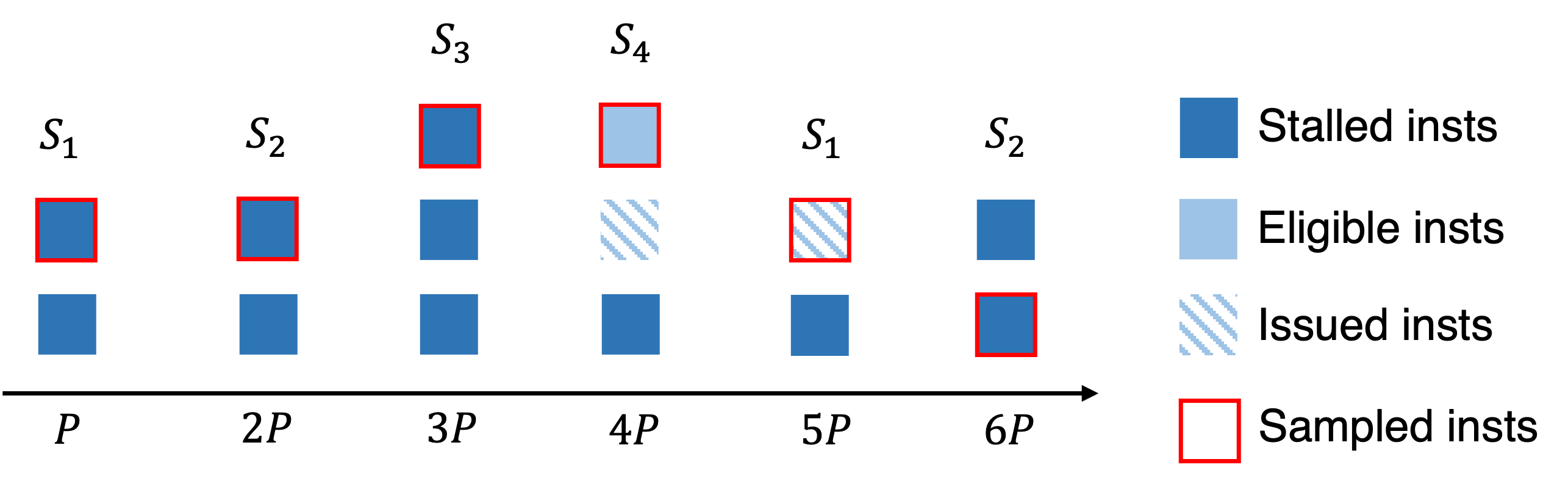
Figure 9.9: NVIDIA’s GPU PC sampling example on an SM. P-6P represent
six sample periods P cycles apart. S_1-S_4 represent four warp schedulers on an SM.#
Table 9.17 shows summary statistics recorded by HPCToolkit about PC samples on NVIDIA GPUs. Of particular note is the metric GSAMP:UTIL. HPCToolkit computes approximate GPU utilization using information gathered using PC sampling. Given the average clock frequency and the sampling rate, if all SMs are active, then HPCToolkit knows how many instruction samples would be expected (GSAMP:EXP) if the GPU was fully active for the interval when it was in use. HPCToolkit approximates the percentage of GPU utilization by comparing the measured samples with the expected samples using the following formula: 100 * (GSAMP:TOT) / (GSAMP:EXP).
Metric |
Description |
|---|---|
GSAMP:DRP |
GPU PC samples: dropped |
GSAMP:EXP |
GPU PC samples: expected |
GSAMP:TOT |
GPU PC samples: measured |
GSAMP:PER |
GPU PC samples: period (GPU cycles) |
GSAMP:UTIL |
GPU percent utilization computed using PC sampling |
Important
To collect PC samples on NVIDIA GPUs, at present HPCToolkit uses an older CUPTI interface that serializes the execution of GPU kernels. HPCToolkit uses this interface so that it can precisely attribute GPU PC samples to CPU calling contexts that invoke GPU kernels. This interface blocks concurrent execution of GPU kernels, which may slow execution. Furthermore, because of kernel serialization, HPCToolkit’s PC sampling measurements will only reflect the GPU activity of kernels running in isolation.
Our experience with CUPTI’s serialization-based API for PC sampling is that the overhead is less than 5x. The overhead of GPU monitoring is principally on the host side. The time spent in GPU operations or in kernels as measured by PC samples is expected to be accurate. However, since execution as a whole is slowed while measuring GPU operations and collecting PC samples, one must be careful about drawing conclusions about overall program performance. Any traces collected while collecting PC samples on NVIDIA GPUs will be dilated and should be viewed as providing qualitative information only.
10.6.2.2. Source Attribution#
To attribute performance within GPU kernels, one must add an appropriate flag to NVIDIA’s compilers to record mappings between machine code and source code. nvcc and nvc++ provide a -lineinfo option that records precise mappings from machine code to source code, including information about inlined functions.
Important
Don’t use nvcc’s -G option when measuring performance. While it records precise mappings from machine code to source code, it also disables all compiler optimizations and generates GPU code that may be vastly slower.
10.6.2.3. Binary analysis#
NVIDIA does not provide an API for analysis of GPU binaries. For that reason, HPCToolkit invokes NVIDIA’s nvdisasm command line tool to analyze control flow in NVIDIA GPU binaries. nvdisasm produces Control Flow Graphs (CFGs) in DOT with assembly code annotations for each node in a CFG. For large CUDA binaries, nvdisasm’s ASCII output files can be huge; however, that is the least of the problems. The biggest problems are that (1) nvdisasm fails to produce a CFG for GPU functions that have certain features, e.g. contain sib calls, and (2) when a GPU binary contains a function that nvdisasm can’t process, it gives up and doesn’t process the remainder of a GPU binary.
To compensate, HPCToolkit inspects the symbol table of an NVIDIA GPU binary and then invokes nvdisasm once for each function in the GPU binary to extract that function’s CFG. With this approach, HPCToolkit is resilient against nvdisasm failures on individual functions. In cases where nvdisasm fails to extract a CFG for a function, HPCToolkit attributes costs for any samples collected to the function as a whole.
Caution
For large binaries with many functions, the cost of invoking nvdisasm to extract a CFG for just one function is not proportional to only the size of the function of interest. That may make the aforementioned approach of using multiple executions of nvdisasm to extract CFGs one function at a time impractical for very large binaries. When we applied this approach to an NVIDIA GPU binary almost a gigabyte in size containing roughly 40K functions, hpcstruct analyzed the binary for two days without completing before we killed it.
If hpcstruct takes too long to analyze anything, it can be interrupted with ^C. Any analysis already complete, will be saved and not recomputed. Restarting hpcstruct will show the first binary where analysis is being reinitiated. A problematic binary can be excluded from analysis by hpcstruct using hpcstruct’s -x|--exclude option. Without program structure information from hpcstruct, HPCToolkit’s hpcprof will be unable to attribute costs to calling contexts within a GPU kernel, loops, or inlined code. However, hpcprof will still be able to attribute PC samples to source lines in kernels and device functions. Usage of the exclude option is discussed elsewhere in a tip in
Section 3.1.3.
10.6.3. Intel GPUs#
HPCToolkit supports profiling, tracing, and PC sampling of GPU-accelerated applications that offload computation onto Intel GPUs using Intel’s Data-parallel C++ programming model supported by Intel’s icpx compiler, OpenMP computations offloaded with Intel’s ifx, icx, or icpx compilers, or OpenCL. At program launch, a user can select whether Intel’s Data-parallel C++ programming model is to execute atop Intel’s OpenCL runtime or Intel’s Level Zero runtime.
Collection of profiles, traces, and PC samples for GPU-accelerated applications was previously described in this chapter. On Intel GPUs, HPCToolkit also supports instrumentation-based measurement of GPU kernels using Intel’s GTPin binary instrumentation tool in conjunction with Intel’s Level Zero runtime.
At present, HPCToolkit only supports instrumentation-based collection of dynamic instruction counts within GPU kernels. Previously, HPCToolkit also supported approximate measurement of memory latency and a variety of statistics for SIMD instructions. However, problems experienced over the years with various versions of GTPin have led us to disable collection of latency and SIMD measurements in the current release of HPCToolkit. These capabilities may work with the most recent version of GTPin but they are untested. Instrumentation can be combined with profiling and tracing in the same execution.
10.6.3.1. Intel PC Sampling#
Hardware support for PC sampling on Intel GPUs report stall reasons for sampled instructions. Table 9.18 shows the mapping of stall reasons reported by Intel’s GPUs into HPCToolkit’s top-down GPU metrics.
Since memory stalls tend to dominate everything else, we attribute all stalls that contain memory dependencies to memory stalls. On Intel GPUs, we report SCOREBOARD ID stalls to GCYCLES:STL:BE:MEM:LAT to indicate a stall waiting for unspecified outstanding memory requests, and SEND stalls to GCYCLES:STL:BE:MEM:REQ since SEND instructions are used to send messages to other components or write to device memory.
Intel GPU Stall Reason |
Stall Reason Description |
Mapping to HPCToolkit top-down GPU metric |
|---|---|---|
ACTIVE |
Actively executing in at least one pipeline |
GCYCLES:ISU |
INST_FETCH |
Stalled due to an instruction fetch operation |
GCYCLES:STL:FE:IFET |
DIST or ACC |
Stalled due to internal pipeline dependency |
GCYCLES:STL:FE:IDEPEND |
SCOREBOARD ID |
Stalled due to memory dependency or internal XVE pipeline dependency |
GCYCLES:STL:BE:MEM:LAT |
SEND |
Stalled due to memory dependency or pipeline dependency for send |
GCYCLES:STL:BE:MEM:REQ |
SYNC |
Stalled due to sync operation |
GCYCLES:STL:BE:SYNC |
CONTROL |
Stalled because one or more threads is waiting for a branch unit |
GCYCLES:STL:BE:RES:BR |
PIPESTALL |
Stalled due to XVE pipeline |
GCYCLES:STL:BE:RES:PIPE |
OTHER |
Stalled due to any other reason |
GCYCLES:STL:BE:MISC:OTHR |
10.6.3.2. Source Attribution#
To attribute performance within GPU kernels, one must add appropriate flags to Intel’s compilers to record mappings between machine instructions and source code. Intel recommends using compiler options -gline-tables-only and -fdebug-info-for-profiling rather than -g. These options can be added to your normal optimization flags.