

7. Monitoring CPU#
hpcrun monitors CPU activity by periodically interrupting execution and recording the program’s call path at each interrupt. The interrupt source — called a sample source — determines what triggers each sample and what is measured. HPCToolkit supports the following sample sources:
Linux timers (
REALTIME,CPUTIME) — sample at regular wall-clock or CPU-time intervals, independent of hardware counter support.I/O tracing (
IO) — record I/O operations to identify time spent in read/write calls.Memory leak detection (
MEMLEAK) — track heap allocations and deallocations to identify memory that is allocated but never freed.Hardware performance counters — measure microarchitectural events such as cache misses, branch mispredictions, and pipeline stalls, via either PAPI or Linux perf_events.
The remainder of this section describes each sample source in detail.
7.1. REALTIME and CPUTIME#
HPCToolkit supports two timer-based sample sources: CPUTIME and
REALTIME.
The unit for periods of these timers is microseconds.
Before describing this capability further, it is worth noting
that the CYCLES event supported by Linux perf_events or PAPI’s PAPI_TOT_CYC
are generally superior to any of the timer-based sampling sources.
The CPUTIME and REALTIME sample sources are based on the POSIX
timers CLOCK_THREAD_CPUTIME_ID and CLOCK_REALTIME with
the Linux SIGEV_THREAD_ID extension.
CPUTIME only counts time when the CPU is running;
REALTIME counts
real (wall clock) time, whether the process is running or not.
Signal delivery for these timers is thread-specific, so these timers are suitable for
profiling multithreaded programs.
Sampling using the REALTIME sample source
may break some applications that don’t handle interrupted syscalls well. In that
case, consider using CPUTIME instead.
The following example, which specifies a period of 5000 microseconds will sample
each thread in app at a rate of approximately 200 times per second.
hpcrun -e REALTIME@5000 app arg ...
do not use more than one timer-based sample source to monitor a program execution.
When using a sample source such as CPUTIME or REALTIME,
we recommend not using another time-based sampling source such as
Linux perf_events CYCLES or PAPI’s PAPI_TOT_CYC.
Technically, this is feasible and hpcrun won’t die.
However, multiple time-based sample sources would compete with one another to measure the
execution and likely lead to dropped samples and possibly distorted results.
7.2. IO#
The IO sample source counts the number of bytes read and
written. This displays two metrics in the viewer: “IO Bytes Read”
and “IO Bytes Written.” The IO source is a synchronous sample
source.
It overrides the functions read, write, fread
and fwrite and records the number of bytes read or
written along with their dynamic context synchronously rather
than relying on data collection triggered by interrupts.
To include this source, use the IO event (no period).
For example,
hpcrun -e IO app arg ...
The IO source is mainly used to find where your program reads or
writes large amounts of data. However, it is also useful for tracing
a program that spends much time in read and write. The
hardware performance counters do not advance while running in
the kernel, so the trace viewer may misrepresent the amount of time
spent in syscalls such as read and write. By adding the
IO source, hpcrun overrides read and write and
thus is able to more accurately count the time spent in these
functions.
7.3. MEMLEAK#
The MEMLEAK sample source counts the number of bytes allocated
and freed. Like IO, MEMLEAK is a synchronous sample
source and does not generate asynchronous interrupts. Instead, it
overrides the malloc family of functions (malloc, calloc,
realloc and free plus memalign, posix_memalign
and valloc) and records the number of bytes
allocated and freed along with their dynamic context.
MEMLEAK allows you to find locations in your program that
allocate memory that is never freed. But note that failure to free a
memory location does not necessarily imply that location has leaked
(missing a pointer to the memory). It is common for programs to
allocate memory that is used throughout the lifetime of the process
and not explicitly free it.
To include this source, use the MEMLEAK event (no period).
For example,
hpcrun -e MEMLEAK app arg ...
If a program allocates and frees many small regions, the MEMLEAK
source may result in a high overhead. In this case, you may reduce
the overhead by using the memleak probability option to record only a
fraction of the mallocs. For example, to monitor 10% of the mallocs,
use:
hpcrun -e MEMLEAK --memleak-prob 0.10 app arg ...
It might appear that if you monitor only 10% of the program’s mallocs, then you would have only a 10% chance of finding the leak. But if a program leaks memory, then it’s likely that it does so many times, all from the same source location. And you only have to find that location once. So, this option can be a useful tool if the overhead of recording all mallocs is prohibitive.
7.4. PAPI#
PAPI, the Performance API, is a library for providing access to the hardware performance counters. PAPI aims to provide a consistent, high-level interface that consists of a universal set of event names that can be used to measure performance on any processor, independent of any processor-specific event names. In some cases, PAPI event names represent quantities synthesized by combining measurements based on multiple native events available on a particular processor. For instance, in some cases PAPI reports total cache misses by measuring and combining data misses and instruction misses. PAPI is available from the University of Tennessee at https://icl.cs.utk.edu/papi.
PAPI focuses mostly on in-core CPU events: cycles, cache misses, floating point operations, mispredicted branches, etc. For example, the following command samples total cycles and L2 cache misses.
hpcrun -e PAPI_TOT_CYC@15000000 -e PAPI_L2_TCM@400000 app arg ...
The precise set of PAPI preset and native events is highly system dependent. Commonly, there are events for machine cycles, cache misses, floating point operations and other more system specific events. However, there are restrictions both on how many events can be sampled at one time and on what events may be sampled together and both restrictions are system dependent. Table below contains a list of commonly available PAPI events.
To see what PAPI events are available on your system, use the
papi_avail command from the bin directory in your PAPI
installation. The event must be both available and not derived to be
usable for sampling. The command papi_native_avail displays
the machine’s native events. Note that on systems with separate
compute nodes, you normally need to run papi_avail on one of
the compute nodes.
Name |
Description |
|---|---|
|
Branch instructions |
|
Conditional branch instructions mispredicted |
|
Floating point instructions |
|
Floating point operations |
|
Level 1 data cache accesses |
|
Level 1 data cache misses |
|
Level 1 instruction cache hits |
|
Level 1 instruction cache misses |
|
Level 2 data cache accesses |
|
Level 2 instruction cache misses |
|
Level 2 cache misses |
|
Load instructions |
|
Store instructions |
|
Data translation lookaside buffer misses |
|
Total cycles |
|
Instructions issued |
|
Instructions completed |
When selecting the period for PAPI events, aim for a rate of
approximately a few hundred samples per second. So, roughly several
million or tens of million for total cycles or a few hundred thousand
for cache misses. PAPI and hpcrun will tolerate sampling rates as
high as 1,000 or even 10,000 samples per second (or more). However, rates
higher than a few hundred samples per second will only increase measurement
overhead and distort the execution of your program; they won’t yield more
accurate results.
Beginning with Linux kernel version 2.6.32, support for accessing performance counters using the Linux perf_events performance monitoring subsystem is built into the kernel. perf_events provides a measurement substrate for PAPI on Linux.
On modern Linux systems that include support for perf_events, PAPI is only recommended for monitoring events outside the scope of the perf_events interface.
7.4.1. Proxy Sampling#
HPCToolkit supports proxy sampling for derived PAPI events. For HPCToolkit to sample a PAPI event directly, the event must not be derived and must trigger hardware interrupts when a threshold is exceeded. For events that cannot trigger interrupts directly, HPCToolkit’s proxy sampling sample on another event that is supported directly and then reads the counter for the derived event. In this case, a native event can serve as a proxy for one or more derived events.
To use proxy sampling, specify the hpcrun command line as usual and
be sure to include at least one non-derived PAPI event. The derived
events will be accumulated automatically when processing a sample trigger for a native event.
We recommend adding PAPI_TOT_CYC as a native event when using proxy sampling, but
proxy sampling will gather data as long as the event set contains at least one
non-derived PAPI event. Proxy sampling requires one non-derived PAPI event to serve as the proxy;
a Linux timer can’t serve as the proxy for a PAPI derived event.
For example, on newer Intel CPUs, often PAPI floating point events are all derived and cannot be sampled directly. In that case, you could count FLOPs by using cycles a proxy event with a command line such as the following. The period for derived events is ignored and may be omitted.
hpcrun -e PAPI_TOT_CYC@6000000 -e PAPI_FP_OPS app arg ...
Attribution of proxy samples is not as accurate as regular samples.
The problem, of course, is that the event that triggered the sample
may not be related to the derived counter. The total count of events
should be accurate, but their location at the leaves in the Calling
Context tree may not be very accurate. However, the higher up the
CCT, the more accurate the attribution becomes. For example, suppose
you profile a loop of mixed integer and floating point operations and
sample on PAPI_TOT_CYC directly and count PAPI_FP_OPS
via proxy sampling. The attribution of flops to individual statements
within the loop is likely to be off. But as long as the loop is long
enough, the count for the loop as a whole (and up the tree) should be
accurate.
7.5. Linux perf_events#
Linux perf_events provides a powerful interface that supports measurement of both application execution and kernel activity. Using perf_events, one can measure both hardware and software events. Using a processor’s hardware performance monitoring unit (PMU), the perf_events interface can measure an execution using any hardware counter supported by the PMU. Examples of hardware events include cycles, instructions completed, cache misses, and stall cycles. Using instrumentation built in to the Linux kernel, the perf_events interface can measure software events. Examples of software events include page faults, context switches, and CPU migrations.
7.5.1. Frequency-based sampling#
The Linux perf_events interface supports frequency-based sampling.
With frequency-based sampling, the kernel automatically selects and adjusts an event period with the
aim of delivering samples for that event at a target sampling frequency.[9]
Unless a user explicitly specifies an event count threshold for an event,
HPCToolkit’s measurement interface will use frequency-based sampling by default.
HPCToolkit’s default sampling frequency is min(300, M-1), where M is the
value specified in the system configuration file /proc/sys/kernel/perf_event_max_sample_rate.
For circumstances where the user wants to use frequency-based sampling but
HPCToolkit’s default sampling frequency is inappropriate,
one can specify the target sampling frequency for a particular event using the notation
event@frate when specifying an event or change the default sampling frequency.
When measuring a dynamically-linked executable using hpcrun, one can change the default sampling frequency using hpcrun’s -c option.
Example
The following command specifies a target sampling frequency of f100 which means 100 samples per second for the CYCLES event.
hpcrun -e CYCLES@f100 my_program
7.5.2. Multiplexing#
Multiplexing enables one to monitor more events in a single execution than the number of hardware counters a processor can support for each thread. The number of events that can be monitored in a single execution is only limited by the maximum number of concurrent events that the kernel will allow a user to multiplex using the perf_events interface.
When more events are specified than can be monitored simultaneously using a thread’s hardware counters,[10] the kernel will employ multiplexing and divide the set of events to be monitored into groups, monitor only one group of events at a time, and cycle repeatedly through the groups as a program executes.
For applications that have very regular,
steady state behavior, e.g., an iterative code with lots of
iterations, multiplexing will yield results that are suitably representative
of execution behavior. However, for executions that consist of
unique short phases, measurements collected using multiplexing may
not accurately represent the execution behavior. To obtain
more accurate measurements, one can run an application multiple times and in
each run collect a subset of events that can be measured without multiplexing.
Results from several such executions can be imported into HPCToolkit’s hpcviewer
and analyzed together.
7.5.3. Profiling with perf_events#
When profiling with native events, by default hpcrun will access them directly using the perf_events API.
To force HPCToolkit to use PAPI to manage monitoring of a native event rather than using perf_events directly
(assuming that HPCToolkit has been configured to include support for PAPI),
one must prefix the native event name with ‘papi::’ as follows:
hpcrun -e papi::CYCLES
For PAPI presets, there is no need to prefix the event with
‘papi::’. For instance it is sufficient to specify PAPI_TOT_CYC event
without any prefix to profile using PAPI. For more information about using PAPI, see Section 6.3.2.
Below, we provide some examples of various ways to measure CYCLES
and INSTRUCTIONS using HPCToolkit’s perf_events measurement substrate:
To sample an execution 100 times per second (frequency-based sampling) counting CYCLES
and 100 times a second counting INSTRUCTIONS:
hpcrun -e CYCLES@f100 -e INSTRUCTIONS@f100 ...
To sample an execution every 1,000,000 cycles and every 1,000,000 instructions using period-based sampling:
hpcrun -e CYCLES@1000000 -e INSTRUCTIONS@1000000
By default, hpcrun uses frequency-based sampling with the rate
300 samples per second per event type. Hence the following command causes HPCToolkit to
sample CYCLES at 300 samples per second and INSTRUCTIONS at 300 samples per second:
hpcrun -e CYCLES -e INSTRUCTIONS ...
One can specify a different default sampling period or frequency using the -c option.
The command below will sample CYCLES and INSTRUCTIONS at 200 samples per second each:
hpcrun -c f200 -e CYCLES -e INSTRUCTIONS ...
7.5.4. Notes#
Linux perf_events uses one file descriptor for each event to be monitored. Furthermore, since
hpcrungenerates one hpcrun file for each thread, and an additional hpctrace file if traces is enabled. Hence foreevents andtthreads, the required number of file descriptors is:t * e + t (+t if trace is enabled)
For instance, if one profiles a multi-threaded program that executes with 500 threads using 4 events, then the required number of file descriptors is
500 threads * 4 events + 500 hpcrun files + 500 hpctrace files = 3000 file descriptors
If the number of file descriptors exceeds the number of maximum number of open files, then the program will crash. To remedy this issue, one needs to increase the number of maximum number of open files allowed.
When a system is configured with suitable permissions, HPCToolkit will sample call stacks within the Linux kernel in addition to application-level call stacks. This feature can be useful to measure kernel activity on behalf of a thread (e.g., zero-filling allocated pages when they are first touched) or to observe where, why, and how long a thread blocks. For a user to be able to sample kernel call stacks, the configuration file
/proc/sys/kernel/perf_event_paranoidmust have a value <=1. To associate addresses in kernel call paths with function names, the value of/proc/sys/kernel/kptr_restrictmust be 0 (number zero). If these settings are not configured in this way on your system, you will need someone with administrator privileges to change them for you to be able to sample call stacks within the kernel.Due to a limitation present in all Linux kernel versions currently available, HPCToolkit’s measurement subsystem can only approximate a thread’s blocking time. At present, Linux reports when a thread blocks but does not report when a thread resumes execution. For that reason, HPCToolkit’s measurement subsystem approximates the time a thread spends blocked using sampling as the time between when the thread blocks and when the thread receives its first sample after resuming execution.
Users need to be cautious when considering measured counts of events that have been collected using hardware counter multiplexing. Currently, it is not obvious to a user if a metric was measured using a multiplexed counter. This information is present in the measurements but is not currently visible in
hpcviewer.
7.5.5. Thread blocking#
When a program executes,
a thread may block waiting for the kernel to complete some operation on its behalf.
For instance, a thread may block waiting for data to become available so that a read operation
can complete. On systems running Linux 4.3 or newer, one can use the perf_events sample source to monitor how much time a thread is blocked and where the blocking occurs. To measure
the time a thread spends blocked, one can profile with BLOCKTIME event and
another time-based event, such as CYCLES. The BLOCKTIME event shouldn’t have any frequency or period specified, whereas CYCLES may have a frequency or period specified.
Example
The following command profiles my_program using BLOCKTIME to how long a thread is blocked and CYCLES events the total cycles spent.
hpcrun -e BLOCKTIME -e CYCLES my_program
7.6. CPU Top-down Profiling#
HPCToolkit supports Intel’s Top-Down Microarchitecture Analysis (TMA) methodology
through a set of special measurement events recognized by hpcrun. TMA provides a
hierarchical framework for diagnosing CPU pipeline bottlenecks by categorizing pipeline
slots into a two-root hierarchy: Active (slots where the CPU is doing useful or
attempted work) and Stall (slots where the CPU is unable to issue micro-operations
due to resource limitations or delays). Each root is further subdivided into
increasingly specific sub-metrics at Levels 2 through 4.
HPCToolkit’s TMA support is currently available on Intel Sapphire Rapids and
newer microarchitectures that provide the PERF_METRICS MSR (Model Specific Register) and the TOPDOWN.SLOTS
fixed counter (Fixed Counter 3). Support requires perf_event_paranoid set to 1 or
lower, or the CAP_PERFMON capability.
7.6.1. TMA Metric Tree#
The TMA metric tree is rooted at Total Slots, which represents the total number of pipeline slot opportunities available to the CPU over a measurement interval — computed as the dispatch width of the processor multiplied by the number of elapsed cycles. Every pipeline slot is accounted for by exactly one of two mutually exclusive categories:
Active, where the CPU was doing useful or attempted work
Stall, where the CPU was blocked and unable to issue micro-operations
Each of these two roots is further subdivided into a hierarchy of increasingly specific bottleneck categories. Active comprises Retiring (slots consumed by instructions that successfully committed) and Bad Speculation (slots wasted on instructions that were later squashed). Stall comprises Frontend Bound (slots lost because the frontend could not deliver instructions) and Backend Bound (slots lost because the backend could not accept new work). These four Level 1 categories form the foundation of TMA diagnosis: at any given measurement scope, the dominant category identifies which subtree to investigate next, drilling down through Levels 2, 3, and 4 until the root cause of the bottleneck is isolated.
Total Slots
├── Active
│   ├── Retiring
│   │   ├── Heavy Operations
│   │   │   ├── Uops Sequencer
│   │   │   └── Few Operations
│   │   └── Light Operations
│   │       ├── FP Arithmetic
│   │       │   ├── X87 Use
│   │       │   ├── FP Scalar
│   │       │   └── FP Vector
│   │       ├── Integer Operations
│   │       └── Memory Operations
│   └── Bad Speculation
│       ├── Misprediction
│       └── Machine Clear
└── Stall
    ├── Frontend Bound
    │   ├── Fetch Latency
    │   │   ├── ICache Misses
    │   │   ├── ITLB Misses
    │   │   ├── LCP
    │   │   ├── DSB Switches
    │   │   ├── Branch Resteers
    │   │   └── MS Switches
    │   └── Fetch Bandwidth
    └── Backend Bound
        ├── Memory Bound
        │   ├── L1 Bound
        │   ├── L2 Bound
        │   ├── L3 Bound
        │   ├── DRAM Bound
        │   │   ├── Memory Bandwidth
        │   │   └── Memory Latency
        │   └── Store Bound
        └── Core Bound
            ├── Divider
            ├── Port Utilization
            └── Serialization
A full TMA analysis from Level 1 to Level 4 requires dozens of hardware performance counters simultaneously, far exceeding the 4–8 programmable counters available on a typical Intel core. HPCToolkit addresses this through subtree selection: rather than attempting a full TMA traversal in a single run, users request the specific branch of the TMA hierarchy they wish to investigate. HPCToolkit then schedules only the counters required for that subtree, keeping the counter budget within hardware limits (if possible) and reducing costly multiplexing.
The recommended workflow is to start with a Level 1 and 2 overview (topdown),
identify the dominant bottleneck category, and then re-profile with the corresponding
subtree event (topdown:retiring, topdown:frontend, or topdown:backend) to get
deeper attribution.
HPCToolkit provides the following TMA measurement events. Each event name is passed
to hpcrun via the -e flag.
7.6.2. Event: topdown#
Collects only TMA Level 1 and Level 2 metrics using PERF_METRICS MSR and
CYCLES as the trigger. This event is the recommended starting point for TMA analysis. It provides
the two root categories (Active and Stall), their Level 1 sub-categories:
Retiring: slots utilized by useful work, i.e., issued uops that eventually get retired.
Bad Speculation: slots utilized by uops representing speculative computation that is found to be unnecessary and is discarded.
Frontend: stalled slots due to instruction fetch and decode issues; the backend is ready to accept work but the frontend cannot supply it.
Backend: slots stalls due to lack of backend resources; the frontend is supplying uops but the backend cannot accept or execute them.
and their Level 2 sub-categories, which provide a high-level characterization of pipeline efficiency without requiring many hardware counters.
Metrics collected:
Root |
L1 |
L2 |
Description |
|---|---|---|---|
Active |
Retiring |
Heavy Operations |
Multi-uop instruction retirement |
Active |
Retiring |
Light Operations |
Single-uop instruction retirement |
Active |
Bad Speculation |
Misprediction |
Slots lost to branch misprediction recovery |
Active |
Bad Speculation |
Machine Clear |
Slots lost to full pipeline flushes |
Stall |
Frontend Bound |
Fetch Latency |
Sustained frontend delivery stalls |
Stall |
Frontend Bound |
Fetch Bandwidth |
Partial frontend throughput reduction |
Stall |
Backend Bound |
Memory Bound |
Backend stalls due to memory subsystem pressure |
Stall |
Backend Bound |
Core Bound |
Backend stalls due to execution resource contention |
7.6.3. Event: topdown:retiring#
Collects TMA Level 1, Level 2, and the full Retiring subtree (Levels 3 and 4
under Retiring). Use this event after a topdown run shows Retiring as the dominant
Active category, indicating the application is compute-bound and optimization
opportunities lie in instruction mix, vectorization, and code generation quality.
High Retiring is generally positive but Heavy Operations and Uops Sequencer indicate
inefficient instruction encoding.
Additional metrics collected beyond topdown:
L2 |
L3 |
L4 |
Description |
|---|---|---|---|
Heavy Operations |
Uops Sequencer |
— |
Uops fetched by the Microcode Sequencer |
Heavy Operations |
Few Operations |
— |
Instructions decoding to 2+ uops (non-MS) |
Light Operations |
FP Arithmetic |
X87 Use |
Legacy x87 FP uops |
Light Operations |
FP Arithmetic |
FP Scalar |
Arithmetic FP scalar uops retired |
Light Operations |
FP Arithmetic |
FP Vector |
Arithmetic FP vector uops retired (SSE/AVX) |
Light Operations |
Integer Operations |
— |
Integer uops retired |
Light Operations |
Memory Operations |
— |
Load and store uops retired |
7.6.4. Event: topdown:frontend#
Collects TMA Level 1, Level 2, and the full Frontend Bound subtree (Levels 3
and 4 under Frontend Bound). Use this event after a topdown run shows Frontend
Bound as the dominant Stall category, indicating the CPU pipeline is starved of
instructions from the fetch and decode stage. Common causes include instruction cache
pressure from large code footprints, ITLB misses in code with many call sites, and
branch misprediction-driven resteers.
Additional metrics collected beyond topdown:
L2 |
L3 |
Description |
|---|---|---|
Fetch Latency |
ICache Misses |
Cycles stalled waiting for instruction cache fills |
Fetch Latency |
ITLB Misses |
Cycles stalled waiting for instruction TLB walks |
Fetch Latency |
LCP |
Cycles stalled due to Length Changing Prefixes in legacy decode |
Fetch Latency |
DSB Switches |
Cycles stalled on transitions from DSB (uop cache) to MITE |
Fetch Latency |
Branch Resteers |
Cycles stalled due to pipeline redirections after branch resolution |
Fetch Latency |
MS Switches |
Cycles stalled on transitions to Microcode Sequencer delivery |
Fetch Bandwidth |
— |
Slots lost to sustained below-peak frontend throughput |
7.6.5. Event: topdown:backend#
Collects TMA Level 1, Level 2, and the full Backend Bound subtree (Levels 3
and 4 under Backend Bound). Use this event after a topdown run shows Backend Bound
as the dominant Stall category. Backend Bound is the most common bottleneck in HPC
workloads. Memory Bound typically indicates cache hierarchy or DRAM pressure; Core
Bound indicates execution unit saturation or serialization.
Additional metrics collected beyond topdown:
L2 |
L3 |
L4 |
Description |
|---|---|---|---|
Memory Bound |
L1 Bound |
— |
Stalls on L1 cache hits with long latency (bank conflicts, forwarding) |
Memory Bound |
L2 Bound |
— |
Stalls on loads satisfied from L2 cache |
Memory Bound |
L3 Bound |
— |
Stalls on loads satisfied from L3 cache |
Memory Bound |
DRAM Bound |
Memory Bandwidth |
DRAM stalls from bandwidth saturation |
Memory Bound |
DRAM Bound |
Memory Latency |
DRAM stalls from individual long-latency accesses |
Memory Bound |
Store Bound |
— |
Stalls from store buffer pressure or load-store forwarding blocks |
Core Bound |
Divider |
— |
Cycles occupied by non-pipelined integer or FP divide |
Core Bound |
Port Utilization |
— |
Cycles lost to uneven or saturated execution port loading |
Core Bound |
Serialization |
— |
Cycles stalled on serializing instructions (CPUID, MFENCE, I/O) |
7.6.6. Event: topdown:all#
Collects the complete TMA hierarchy from Level 1 to Level 4 across all subtrees
simultaneously. This requires the largest counter budget and may involve counter
multiplexing on hardware with fewer than the required programmable counters. Use
topdown:all when you want a comprehensive profile in a single run and are willing
to accept the additional measurement overhead and potential multiplexing error.
For most workflows, using topdown first and then re-profiling with a targeted
subtree event is preferable to topdown:all, as it produces more accurate
measurements per subtree with lower overhead.
7.6.7. Combining Events#
TMA events can be combined with each other and with conventional perf_events
hardware or software events in the same hpcrun invocation. Each event is specified
with a separate -e flag.
Combining two TMA subtrees:
hpcrun -e topdown:frontend -e topdown:backend ./myapp
This collects Level 1, Level 2, the full Frontend Bound subtree, and the full Backend Bound subtree in a single run. This is equivalent to running the two subtree events separately and merging results, but with higher overhead and more multiplexing inaccuracies.
Combining TMA with conventional events:
hpcrun -e topdown -e MEM_LOAD_RETIRED:L3_MISS ./myapp
This collects TMA Level 1 and 2 alongside explicit L3 miss sampling, allowing TMA’s Backend Bound → Memory Bound attribution to be cross-validated with direct cache miss counts attributed to call paths.
Note on counter budget: When combining events, Linux kernel checks whether the total required hardware counters fit within the available PMU slots. If the combination exceeds the counter budget, it may fall back to time-division multiplexing, which can introduce sampling error.
7.6.8. Workflow Example#
The following example demonstrates the recommended iterative TMA workflow using a naive matrix multiplication implementation:
    for (int i = 0; i < N; i++)
        for (int j = 0; j < N; j++)
            for (int k = 0; k < N; k++)
                C[i][j] += A[i][k] * B[k][j];
7.6.8.1. Step 1 — Performance Overview#
Run the following commands to profile the matrix multiplication program (called ./matmul) with the basic topdown event and examine the snapshot of performance metrics in hpcviewer.
hpcrun -e topdown ./matmul
hpcstruct hpctoolkit-matmul-measurements
hpcprof hpctoolkit-matmul-measurements
hpcviewer hpctoolkit-matmul-database
The first command is to profile ./matmul with the topdown event, which collects CPU topdown metrics for level 1 and 2.
Since we do not know the exact cause of the performance bottleneck, we use the topdown event to get a snapshot of the performance metrics with low overhead.
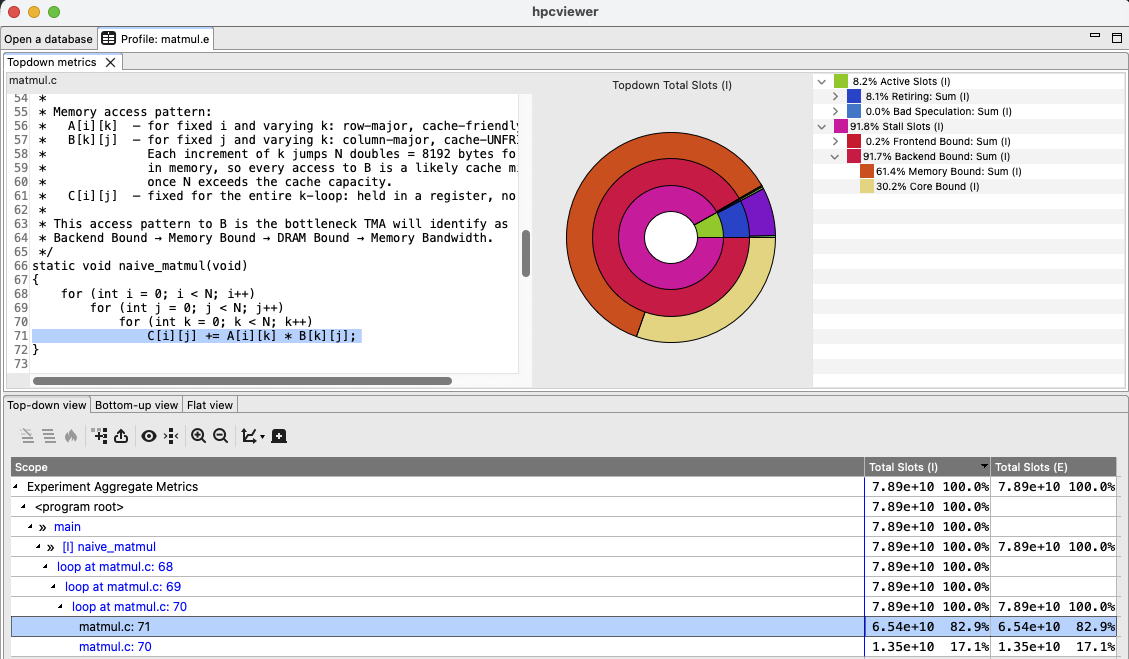
The fourth command, we examine the top-down metrics in hpcviewer as shown below.
Note
In hpcviewer’s top-down metrics pane, the circle at the center of the initial donut chart represents the root Total Slots metric. The innermost ring of the donut chart represents the children of the metric at the graph’s center. Each subsequent ring represents the children of the metrics in the ring it encloses. Child metrics in a ring occupy the same arc as their parent metric in the ring it encloses. In the tree-based representation of the metric hierarchy, each node in the tree contains a metric name and the percentage of the total slots associated with the metric.
Selecting any cell in an inclusive or exclusive Total Slots column of hpcviewer’s metric pane will
refresh the top-down metrics pane to show the breakdown of Total Slots for the scope represented by the line containing the selected cell. Section 11.2.1.4 describes how to explore the data presented by the top-down metric hierarchy in hpcviewer’s top-down pane.
Both the donut chart (top-middle) and the tree (top-right) shows that Stall Slots dominates, with Backend Bound accounting for 92% of slots at the top-level loop and Memory Bound dominant at Level 2 (62% of the total slots). This indicates the naive column-major access pattern is creating memory pressure. The next step is to profile the backend bound subtree to get more detailed metrics.
7.6.8.2. Step 2 — Backend Bound Subtree#
We profile with the topdown:backend event to get more detailed metrics, followed by running hpcstruct and hpcprof to generate the database.
hpcrun -e topdown:backend ./matmul
... # Run hpcstruct, hpcprof and hpcviewer as usual
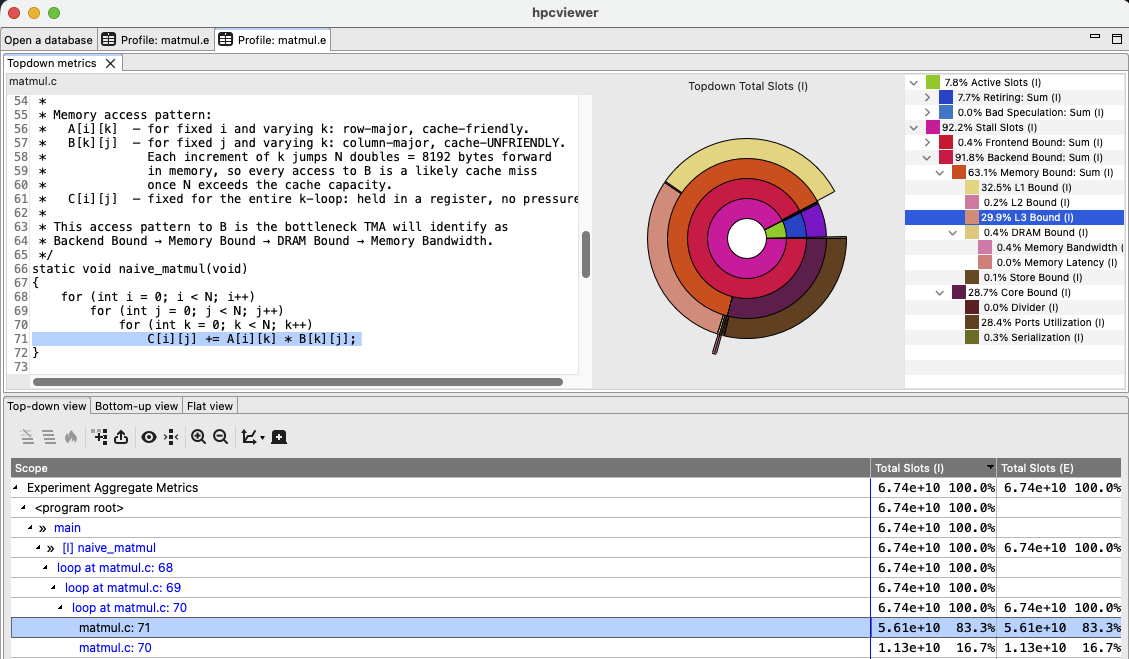
As shown in hpcviewer snapshot below, the Level 3 and 4 metrics reveal that L3 Bound is one of the dominant sub-metrics (around 30% of the total time), confirming cache saturation from the strided access pattern. This diagnosis guides the optimization: loop interchange to row-major access, then cache blocking.
After recompiling the code, we verify the performance improvement by profiling with the topdown event again.
7.6.8.3. Step 3 — Verify After Optimization#
hpcrun -e topdown -o hpctoolkit-matmul-opt-measurements ./matmul_optimized
... # Run hpcstruct, hpcprof and hpcviewer as usual
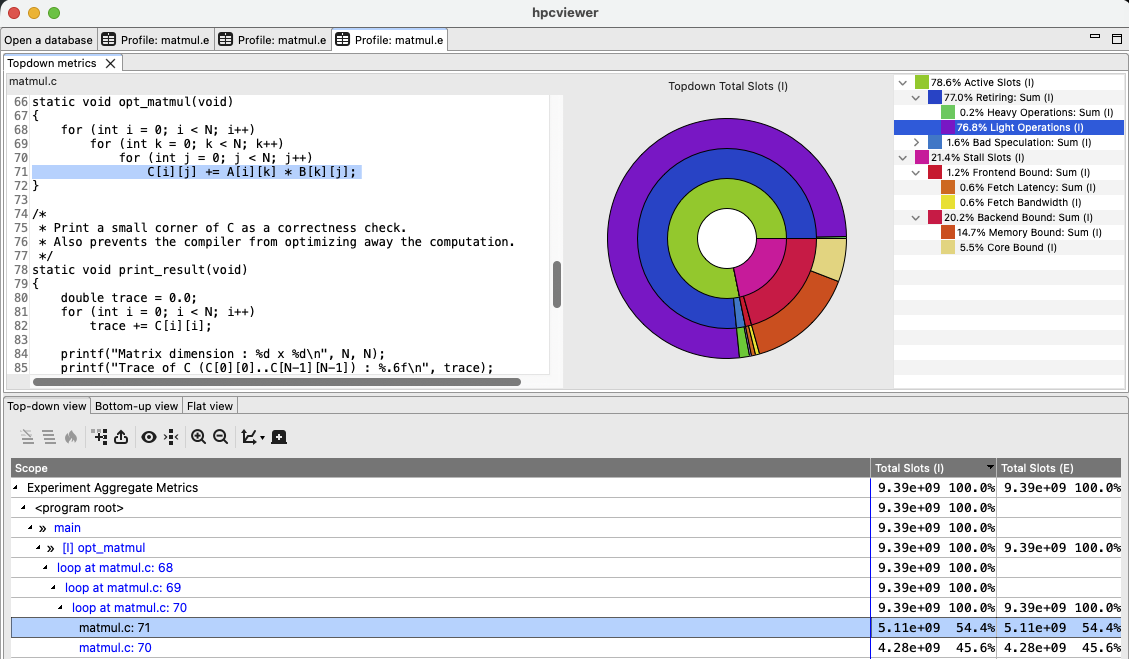
After optimization, Backend Bound decreases substantially to just 15%. The Active root
grows to %79 from just %8, with Retiring increasing to almost 77%, and Light Operations of almost 77%
reflecting improved cache-resident load/store throughput.
7.6.9. Interpretation Notes#
Top-down measurement uses proxy sampling. HPCToolkit collects TMA metrics
through proxy sampling: a normal hardware counter such as CYCLES acts as the
sampling trigger and fires a periodic interrupt. At each interrupt, hpcrun reads a
snapshot of the TMA hardware counters — specifically the PERF_METRICS MSR and
TOPDOWN.SLOTS — which have been accumulating pipeline slot fractions since the
previous sample. The trigger event and the measured events (PERF_METRICS)
are therefore different: The trigger event determines when a sample is taken, while
PERF_METRICS provides what is measured. Because the snapshot reflects an
inter-sample interval of thousands of cycles rather than a single instruction, TMA
attribution is not accurate at the instruction level but is reliable and meaningful
at the granularity of loops and functions.
Multiplexing and accuracy. When the number of required hardware counters exceeds
the available PMU slots, Linux kernel time-multiplexes counters across the measurement
period and scales the results. Multiplexed measurements are less accurate than
direct measurements. The topdown event are each designed to fit within a typical hardware counter
budget without multiplexing. topdown:retiring, topdown:frontend, and
topdown:backend, topdown:all and combinations of multiple subtree
events are more likely to require multiplexing.
Hardware requirements. TMA events require:
Intel Sapphire Rapids or newer microarchitecture
perf_event_paranoid<= 1, orCAP_PERFMONcapability
7.6.10. Summary of Events#
Event |
TMA Coverage |
Recommended Use |
|---|---|---|
|
Active + Stall roots, L1–L2 all subtrees |
First-pass bottleneck identification |
|
L1–L2 all + L3–L4 Retiring subtree |
Diagnose instruction-mix and vectorization issues |
|
L1–L2 all + L3–L4 Frontend Bound subtree |
Diagnose instruction fetch and decode stalls |
|
L1–L2 all + L3–L4 Backend Bound subtree |
Diagnose memory or execution resource bottlenecks |
|
L1–L4 all subtrees |
Comprehensive single-run profile (higher overhead) |
Tip
Events may be combined with -e flags, and its sampling frequency can be adjusted with @ suffix, such as:
hpcrun -e topdown:frontend@f100 -e topdown:backend@f150 my_program